Why Some USB-C Cables Cannot Charge Laptops Properly (2026 Engineering Guide)
The charger supports:
• 100W PD charging
• USB-C fast charging
• laptop charging
• multiple fast charging protocols
Everything looks correct.
But then something strange happens.
Your laptop:
• charges extremely slowly
• gains only 1–2% battery after 20 minutes
• shows “Plugged In, Not Charging”
• loses battery while gaming
• disconnects randomly during charging
Most people immediately blame the charger.
But in many real-world cases: 👉 the USB-C cable is the real problem.
And in 2026, this issue is becoming far more common.
The Laptop Charging Problem Most Users Don't Understand
Phone charging is relatively forgiving.
Even low-quality cables can often handle:
• 20W charging
• 25W charging
• 30W charging
without major problems.
But laptops are completely different.
Modern USB-C laptops often require:
• 65W charging
• 100W charging
• 140W charging
• stable voltage negotiation
• continuous high-current delivery
At these power levels, the cable becomes a critical engineering component — not just an accessory.
Why Laptop Charging Is Much More Demanding
A smartphone battery typically consumes far less power than a laptop under load.
For example:
A phone may draw: 15W–30W
But a laptop may draw: 65W–140W continuously
And gaming laptops may spike even higher during:
• rendering
• gaming
• compiling code
• AI workloads
• video exporting
This creates a major challenge for USB-C cables.
Real Scenario: “Why Is My MacBook Charging So Slowly?”
This is now one of the most searched USB-C charging problems online.
A typical situation looks like this:
A user buys:
• a 100W GaN charger
• a premium desktop charger
• a new MacBook Pro
But keeps using an older USB-C cable from a phone charger.
The result:
• charging becomes unstable
• macOS displays low-power warnings
• the battery percentage barely increases
• the charger becomes hotter than expected
The charger may actually be working perfectly.
The cable simply cannot deliver the required power reliably.
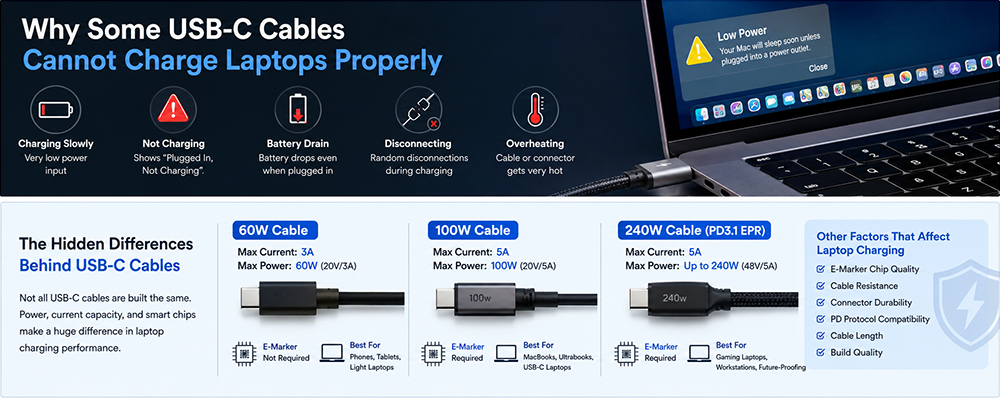
The Biggest Hidden Issue: 3A vs 5A USB-C Cables
This is where many charging problems begin.
Not all USB-C cables support the same current.
Standard USB-C cables:
Usually support: 3A current
Under USB Power Delivery:
20V × 3A = 60W
That means the cable is limited to: 60W maximum.
High-power laptop charging:
Often requires: 5A current
Which enables:
• 100W charging
• 140W charging
• PD3.1 charging
• EPR charging
Without 5A support, charging performance may collapse under laptop workloads.
Why Some Laptops Refuse to Charge Properly
Modern laptops are smarter than many users realize.
Today’s USB-C systems continuously monitor:
• cable capability
• current stability
• voltage negotiation
• thermal behavior
• PD communication
If the system detects limitations, it may intentionally reduce charging speed for safety.
This is why some laptops:
• refuse fast charging
• throttle charging power
• display warning messages
• disconnect repeatedly
even when the charger itself is powerful enough.
E-Marker Chips: The Hidden Requirement Many Users Miss
Once USB-C charging exceeds 60W, cables typically require:
E-Marker chips.
An E-Marker chip is a small controller embedded inside higher-power USB-C cables.
It communicates:
• supported current
• wattage capability
• PD compatibility
• voltage support
to both the charger and the laptop.
Without this communication, many laptops automatically reduce charging power.
Why Cheap USB-C Cables Often Fail With Laptops
Many low-cost USB-C cables are designed primarily for:
• phone charging
• basic accessories
• low-power devices
Internally, these cables often use:
• thinner copper wires
• weaker insulation
• poor shielding
• unstable connectors
• ow-grade soldering
At phone charging levels, the problems may not appear immediately.
But under sustained laptop charging:
the weaknesses become obvious.
Symptoms of a Poor Laptop Charging Cable
A weak or incompatible cable may cause:
• slow charging
• battery drain while plugged in
• overheating connectors
• charging interruptions
• unstable external monitor connections
• charging only at certain angles
• random charging drops
These problems become even more visible with:
• gaming laptops
• MacBook Pro models
• high-power workstation laptops
• multi-monitor USB-C setups
Why Gaming Laptops Expose Cable Weaknesses Faster
Gaming laptops are among the most demanding USB-C charging devices.
Unlike phones, gaming systems often consume large bursts of power during:
• GPU workloads
• gaming sessions
• video rendering
• AI tasks
• 3D modeling
A weak cable may initially appear functional…
until the laptop enters heavy load conditions.
Then users suddenly notice:
• battery percentage dropping while plugged in
• unstable charging
• power throttling
• overheating connectors
This is why gaming laptops increasingly require: high-quality PD3.1 EPR cables.
The Growing Importance of PD3.1 and EPR Cables
USB PD3.1 introduced:
• 28V / 36V / 48V
Extended Power Range (EPR) modes.
This allows USB-C charging up to: 240W.
But higher voltage and current also demand much stricter cable engineering.
Modern EPR cables require:
• advanced E-Marker chips
• improved insulation
• lower resistance
• better heat management
• stronger connectors
This is one reason high-quality laptop charging cables cost more than standard phone cables.
Why Cable Resistance Matters More Than People Think
Every cable has electrical resistance.
Low-quality cables often have higher resistance because they use:
• thinner conductors
• lower-purity copper
• poor manufacturing tolerances
Higher resistance causes:
• voltage drop
• heat generation
• reduced charging efficiency
Under laptop charging loads, these effects become much more noticeable.
This is why some USB-C connectors become unusually warm during charging.
Another Overlooked Problem: “USB-C” Does Not Always Mean Full-Featured
This confuses many consumers.
Some USB-C cables support:
• charging only
Others support:
• charging + data
Others support:
• high-speed video output
• Thunderbolt
• high-power charging
Two cables may look identical externally…
while behaving completely differently internally.
This creates major confusion in the USB-C ecosystem.
Why Professional Charger Manufacturers Focus on Cable Engineering
Modern fast charging performance depends on the entire charging chain:
• charger
• cable
• connector
• PD communication
• thermal design
This is why professional charger manufacturers increasingly invest in:
• E-Marker optimization
• cable resistance reduction
• connector durability
• thermal reliability
• PD3.1 compatibility testing
instead of focusing only on charger wattage.
ZONSAN's Engineering Perspective
As a professional GaN charger manufacturer and OEM fast charging supplier, Zonsan Power
closely follows the evolution of USB-C laptop charging systems.
One of the biggest industry changes in recent years is that cable engineering has become just as important as charger engineering.
For applications such as:
• MacBook charging
• gaming laptop charging
• 140W PD3.1 charging
• Samsung PPS charging
• multi-port desktop charging
stable cable communication and thermal performance are now critical parts of the charging experience.
How to Avoid USB-C Laptop Charging Problems
Choose the Correct Cable Wattage
For laptops:
• 60W cables are often insufficient
• 100W cables are safer
• 240W PD3.1 cables provide better future-proofing
Use E-Marker Cables
Especially for:
• MacBooks
• gaming laptops
• workstation laptops
• high-power GaN chargers
Avoid Ultra-Cheap USB-C Cables
Extremely cheap cables often compromise:
• copper quality
• shielding
• connector durability
• thermal stability
Match Charger + Cable + Laptop Properly
The entire charging ecosystem must support the same standards.
A powerful charger alone cannot guarantee fast charging.
Final Thoughts
USB-C charging looks simple from the outside.
But internally, modern laptop charging systems are highly sophisticated.
Many charging issues blamed on chargers are actually caused by:
• cable limitations
• poor E-Marker communication
• unstable current handling
• excessive resistance
• incompatible USB-C specifications
As USB-C charging continues evolving toward:
• 140W charging
• 240W charging
• PD3.1 and PD3.2 ecosystems
• advanced GaN charging
…the importance of cable quality will only continue growing.
In the future, choosing the correct USB-C cable may become just as important as choosing the laptop itself.
Read more articles about the charger adapter industry:
• “What Is an E-Marker Chip and Why Does Your USB-C Cable Need One?”↗
• “USB Power Delivery Specification”↗
• “USB Type-C Cable and Connector Specification”↗
FAQ (People Also Ask)
Q1: Why does my laptop charge slowly through USB-C?
Your USB-C cable may not support sufficient wattage or current for laptop charging.
Q2: Can a bad USB-C cable damage my laptop?
Poor-quality cables may cause overheating, unstable charging, or long-term reliability problems.
Q3: Why does my MacBook say “Not Charging”?
The charger or cable may not support the required power delivery level.
Q4: Do all USB-C cables support laptop charging?
No. Many USB-C cables are designed only for low-power phone charging.
Q5: Why does my gaming laptop lose battery while plugged in?
The cable or charger may not deliver enough power during high workloads.
Q6: What cable do I need for 140W charging?
You need a PD3.1-compatible EPR USB-C cable with E-Marker support.
Q7: Why are some USB-C cables thicker?
Higher-power cables use thicker conductors and better insulation to handle more current safely.
Q8: Is a 240W USB-C cable worth buying?
For future-proof laptop charging and PD3.1 compatibility, 240W cables provide better long-term flexibility.
Lee mas
Lee mas
Lee mas