Why Your iPhone Battery Might Swell — and How to Handle It Safely (2026 Guide)
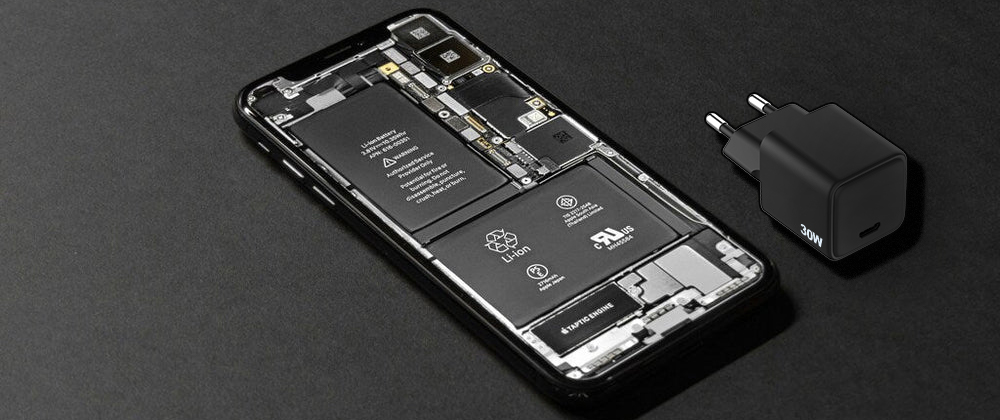
What Is iPhone Battery Swelling?
iPhone battery swelling occurs when the lithium-ion battery inside the phone produces excess gas due to chemical reactions. This gas has nowhere to escape, causing the battery to expand and push against the phone’s internal components.
In practical terms, a swollen battery may:
· Lift or crack the screen
· Warp the phone’s frame
· Prevent buttons from working properly
This is not a cosmetic issue — it is a safety-related battery failure.
Why Do iPhone Batteries Swell?
1. Battery Aging and Natural Degradation
Lithium-ion batteries are consumable components. Over time, repeated charge cycles cause internal chemical breakdown. As the battery ages, side reactions may produce gas, leading to swelling.
Common scenario:
iPhones that are 2–4 years old and used daily are more likely to experience battery degradation.
2. Overheating During Charging or Use
Heat is one of the biggest enemies of lithium-ion batteries. Charging your iPhone in high-temperature environments or trapping heat (for example, charging on a bed or under a pillow) increases internal pressure.
High heat can be caused by:
· Poor ventilation during charging
· Using power-hungry apps while charging
· Exposure to hot cars or direct sunlight
3. Low-Quality or Unsafe Chargers
Uncertified or poorly designed phone chargers may deliver unstable voltage or current. This stresses the battery and accelerates chemical breakdown, increasing the risk of swelling.
Using a certified, well-regulated charger is critical for long-term battery safety.
4. Overcharging and Power Stress
While modern iPhones have built-in charging protection, long-term exposure to unstable power or constant high-power fast charging can still stress an aging battery.
Battery swelling is more likely when:
· The battery is already degraded
· Charging heat is poorly managed
· Power delivery is unstable
5. Physical Damage or Manufacturing Defects
Dropping the phone or exposing it to moisture can damage battery layers internally, even if the phone looks fine on the outside. Rare manufacturing defects may also lead to abnormal chemical reactions inside the battery.
Warning Signs of a Swollen iPhone Battery
You should stop using the device immediately if you notice:
· Screen lifting or separating from the frame
· Phone rocking when placed on a flat surface
· Reduced touch sensitivity or stuck buttons
· Rapid battery drain or unexpected shutdowns
· Phone feeling unusually hot, even when idle
Is a Swollen iPhone Battery Dangerous?
Yes. A swollen battery can be dangerous if ignored.
Potential risks include:
· Screen cracking or internal damage
· Battery rupture or leakage
· Fire hazard if the battery is punctured
Although explosions are rare, battery swelling is a clear warning sign that the battery is no longer safe.

What to Do If Your iPhone Battery Swells
Step 1: Stop Using the Phone Immediately
Do not charge it. Do not press on the screen. Avoid applying pressure to the swollen area.
Step 2: Power Off the Device
If possible, shut down the iPhone to reduce electrical and thermal stress.
Step 3: Move It to a Safe Location
Place the phone on a non-flammable surface away from heat sources and flammable materials.
Step 4: Contact Professional Support
Visit an Apple Authorized Service Provider or a certified repair center. Battery replacement is the only safe solution.
⚠️ Never attempt to puncture, bend, or remove the battery yourself.
Can You Prevent iPhone Battery Swelling?
While no battery lasts forever, you can significantly reduce risk by following best practices:
✔ Use Certified Chargers
Choose chargers with stable power output and proper safety protections.
✔ Avoid Excessive Heat
Do not charge your phone in hot environments or cover it during charging.
✔ Don’t Ignore Battery Health Warnings
If iOS reports degraded battery health, consider replacement early.
✔ Avoid Physical Damage
Protect your phone from drops, moisture, and extreme temperatures.
iPhone Battery Swelling vs Normal Battery Wear
| Issue Normal | Wear Battery | Swelling |
| Battery life | Shorter runtime | Rapid degradation |
| Phone shape | Normal | Warped or lifted |
| Safety risk | Low | High |
| Action needed | Optional replacement | Immediate replacement |
Frequently Asked Questions (FAQ)
Q1: Can a swollen iPhone battery explode?
A swollen battery rarely explodes, but it does increase the risk of fire or rupture if damaged. It should be replaced immediately.
Q2: Is it safe to keep using my iPhone if the battery is swollen?
No. Continued use increases the risk of screen damage and safety hazards.
Q3: Does fast charging cause iPhone battery swelling?
Fast charging itself is safe when using certified chargers, but heat and aging batteries increase swelling risk over time.
Q4: Will Apple replace a swollen battery?
Apple or authorized service centers typically recommend full battery replacement for swollen batteries.
Q5: Can overnight charging cause battery swelling?
Overnight charging alone doesn’t cause swelling, but combined with heat, poor chargers, or aging batteries, it can accelerate battery stress.
Q6: Should I store a swollen iPhone at home?
Only temporarily and in a cool, non-flammable area until it can be serviced.
Key Takeaway
iPhone battery swelling is a safety warning, not a minor defect.
It is caused by battery aging, heat, unstable charging, or physical damage. The safest response is to stop using the device immediately and replace the battery through professional service.
Q1: Can a swollen iPhone battery explode?
A swollen battery rarely explodes, but it does increase the risk of fire or rupture if damaged. It should be replaced immediately.
Q2: Is it safe to keep using my iPhone if the battery is swollen?
No. Continued use increases the risk of screen damage and safety hazards.
Q3: Does fast charging cause iPhone battery swelling?
Fast charging itself is safe when using certified chargers, but heat and aging batteries increase swelling risk over time.
Q4: Will Apple replace a swollen battery?
Apple or authorized service centers typically recommend full battery replacement for swollen batteries.
Q5: Can overnight charging cause battery swelling?
Overnight charging alone doesn’t cause swelling, but combined with heat, poor chargers, or aging batteries, it can accelerate battery stress.
Q6: Should I store a swollen iPhone at home?
Only temporarily and in a cool, non-flammable area until it can be serviced.
Key Takeaway
iPhone battery swelling is a safety warning, not a minor defect.
It is caused by battery aging, heat, unstable charging, or physical damage. The safest response is to stop using the device immediately and replace the battery through professional service.