Best Desktop Charger for Desk Setup: USB-C, GaN & PD Complete Guide 2026
While these devices improve productivity and convenience, they also create a common problem:
Too many chargers, too many cables, and not enough space on the desk.
A traditional wall charger may work well for one device, but it is often not the best solution for a modern desk environment. Users today need a more organized and efficient charging solution that can power multiple devices at the same time.
This is why desktop chargers are becoming increasingly popular.
A modern desktop charger can provide:
• Multiple charging ports
• High-speed USB-C PD charging
• Support for laptops and mobile devices
• Better cable management
• A cleaner workspace
With technologies such as GaN (Gallium Nitride) and USB-C Power Delivery (PD), today's desktop chargers can deliver higher power output while maintaining a compact design.
In this guide, we will explain:
• What a desktop charger is
• How a desktop charger differs from a traditional wall charger
• What features to look for when choosing a desk charging solution
• How much power your desk setup really needs
• Why GaN desktop chargers are becoming the preferred choice for modern workspaces
Quick Answer: What Is the Best Desktop Charger for a Desk Setup?
The best desktop charger for a desk setup is one that provides enough power for all connected devices, supports modern charging protocols such as USB-C PD, and offers multiple ports for convenient charging.
For most users:
• 30W-45W desktop chargers are suitable for smartphones, tablets, and small devices.
• 65W desktop chargers are ideal for laptops, tablets, and smartphones.
• 100W-240W desktop chargers are better for professional workstations and multiple high-power devices.
A GaN desktop charger is often the best choice because it provides:
• Higher chargig efficiency
• Smaller size
• Better heat management
• Higher power density
Why Does Your Desk Setup Need a Better Charging Solution?
Many people still use separate chargers for each device:
• Laptop charger / Phone charger / Tablet charger / Earbuds charger / Watch charger
This creates several problems:
1. Cable Clutter
Multiple chargers and cables can quickly make a desk look messy.
A multi-port desktop charger allows users to replace several adapters with one centralized charging device.
2. Limited Power Availability
A standard charger may not provide enough power for multiple devices.
For example:
A smartphone charger may charge a phone efficiently but cannot provide enough power for:
• A laptop
• A tablet
• Multiple devices simultaneously
3. Poor Workspace Organization
A professional desk setup requires better cable management.
A desktop charger placed on the desk allows:
• Easier access
• Shorter cable distance
• Cleaner workspace
• More convenient daily charging
What Is a Desktop Charger?
A desktop charger is a charging adapter designed to sit on a desk or workstation and provide power to multiple electronic devices.
Unlike a traditional wall charger that plugs directly into a wall socket, a desktop charger usually has:
• A separate AC power cable
• Multiple USB charging ports
• Higher output capacity
• Better stability for multi-device charging
Common desktop charger ports include:
• USB-C
• USB-A
• Multiple USB-C ports
Modern desktop chargers are widely used for:
• Home offices
• Corporate offices
• Gaming desks
• Creative workstations
• Conference rooms
How Does a Desktop Charger Work?
A desktop charger converts AC power from a wall outlet into DC power suitable for electronic devices.
The charging process includes several stages:
1. AC Power Input
Electricity enters the charger through the AC input cable.
Most desktop chargers support:
• 100V-240V universal voltage
• 50/60Hz frequency
This allows them to work in different countries and regions.
2. Power Conversion
Inside the charger, electronic components convert high-voltage AC power into safe DC power.
Important components include:
• Power management IC
• Transformer
• Capacitors
• MOSFET components
• Control circuits
The quality of these components affects:
• Charging efficiency
• Safety
• Heat generation
• Product lifespan
3. Intelligent Power Distribution
Modern desktop chargers can automatically detect connected devices and adjust output power.
For example:
A laptop may receive:
• 65W USB-C PD power
While a smartphone may receive:
• 20W-30W fast charging power
This intelligent power allocation prevents unnecessary power waste.
Desktop Charger vs Wall Charger: What Is the Difference?
Many users confuse desktop chargers with standard wall chargers.
Although both provide charging power, they are designed for different applications.
Desktop Charger vs Wall Charger Comparison
| Feature | Desktop Charger | Wall Charger |
| Installation | Sits on desk | Plugs directly into wall |
| Ports | Usually multiple ports | Usually 1-3 ports |
| Power Output | Medium to high power | Low to medium power |
| Device Support | Multiple devices | Individual devices |
| Cable Management | Better for desk setups | Less organized |
| Best Use | Office and workstation | Travel and daily mobile use |
Advantages of a Desktop Charger
1. Charge Multiple Devices at Once
One of the biggest benefits of a desktop charger is multi-device charging.
A single charger can power:
• Laptop, Smartphone, Tablet, Wireless accessories
This reduces the need for multiple adapters.
2. Higher Power Output
Modern desktop chargers often provide higher wattage than traditional phone chargers.
Common power levels include:
• 45W, 65W, 67W, 100W, 120W, 140W, 240W
Higher output allows one charger to support more demanding devices.
3. Better Desk Organization
A desktop charger creates a centralized charging point.
Instead of having multiple chargers around the workspace:
Before:
• Laptop charger
• Phone charger
• Tablet charger
• Earbuds charger
After:
One desktop charger → Multiple devices
This creates a cleaner and more efficient workspace.
Key Features to Look for in a Desktop Charger
Choosing a desktop charger is not only about wattage.
A good desk charging solution should consider:
• Charging speed
• Port configuration
• Device compatibility
• Safety features
• Size
• Technology platform
1. USB-C PD Fast Charging Support
USB-C Power Delivery (PD) is one of the most important features in modern desktop chargers.
USB PD allows chargers and devices to communicate and select the appropriate:
• Voltage
• Current
• Power level
Benefits include:
• Faster charging
• Better efficiency
• Wider device compatibility
USB-C PD desktop chargers can support:
• Smartphones, Tablets, Laptops, Gaming devices
2. GaN Technology
GaN (Gallium Nitride) is one of the biggest innovations in charger design.
Traditional chargers use silicon-based components.
GaN technology provides:
• Higher switching efficiency
• Less heat generation
• Smaller size
• Higher power density
This allows manufacturers to create compact desktop chargers with higher output.
For example:
A GaN desktop charger can deliver 100W or more power while remaining significantly smaller than many traditional silicon chargers.
3. Multiple Charging Ports
A modern desk setup usually requires more than one charging port.
Common configurations include:
Dual Port Charger
Suitable for:
• Laptop + phone
• Tablet + phone
Three-Port Charger
Suitable for:
• Laptop
• Smartphone
• Accessories
Four-Port Desktop Charger
Suitable for:
• Professional workstations
• Multiple users
• Shared office environments
4. Power Output
Choosing the correct wattage is important.
A charger with too little power may charge slowly or fail to support certain devices.
A charger with excessive power may be unnecessary for simple devices.
Common recommendations:
| Power Output | Suitable Devices |
| 20W-30W | Smartphones, earbuds |
| 45W | Tablets, lightweight laptops |
| 65W | Laptops, tablets, phones |
| 100W | Multiple devices, professional laptops |
| 140W-240W | High-performance devices and advanced workstations |
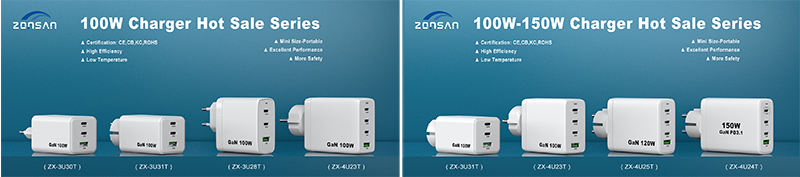
Best Desktop Charger for Different Desk Setups
The ideal desktop charger depends on what devices you use every day.
A simple home office setup may only require a compact USB-C charger, while a professional workstation with multiple devices may need a high-power multi-port desktop charger.
Choosing the right charger wattage and port configuration can improve charging efficiency and create a cleaner workspace.
Best Desktop Charger for Home Office Setup
A home office usually includes:
• Laptop, Smartphone, Tablet ,Wireless earbuds, Smartwatch
• Keyboard and mouse
For this type of setup, a 45W-65W desktop charger is usually enough.
Recommended features:
• At least one USB-C PD port
• One or more additional USB ports
• Compact design
• Low heat generation
A 65W GaN desktop charger is a popular choice because it can typically charge:
• Laptop, Smartphone, Tablet
with only one charging device.
Example setup:
| Device | Recommended Power |
| Smartphone | 20W-30W |
| Tablet | 30W-45W |
| Ultrabook laptop | 45W-65W |
Best Desktop Charger for Business Office Setup
Business users often require more flexibility.
A typical office desk may include:
• Business laptop, Smartphone, Tablet, Conference equipment, Accessories
For office environments, a desktop charger with multiple ports is more practical.
Recommended specifications:
• 65W-100W output
• Multiple USB-C ports
• USB PD support
• Intelligent power distribution
A multi-port desktop charger allows employees to charge multiple devices without using several adapters.
Benefits for office environments:
• Cleaner desks
• Less cable clutter
• Easier device management
• Improved workspace efficiency
Best Desktop Charger for Gaming Desk Setup
Gaming setups usually contain more power-demanding devices.
Typical equipment includes:
• Gaming laptop
• Smartphone
• Wireless headset
• Controllers
• Portable gaming devices
A gaming desk may require:
• 100W or higher output
• Multiple charging ports
• Strong thermal performance
A high-power GaN desktop charger is suitable because it can provide more power while maintaining a compact size.
Recommended features:
• 100W USB-C PD
• Multiple USB-C ports
• Advanced heat management
• Fast charging support
Best Desktop Charger for Creative Professionals
Creative professionals often work with:
• High-performance laptops
• Tablets
• Cameras
• External accessories
• Storage devices
Examples include:
• Designers
• Video editors
• Photographers
• Engineers
These users typically benefit from:
• 100W-240W desktop charging solutions
• Multiple high-power USB-C ports
• Stable long-term operation
A powerful desktop charger can reduce the number of adapters needed on a workstation.
How Many Watts Do You Need for a Desktop Charger?
Choosing the correct wattage is one of the most important decisions when buying a desktop charger.
More power is not always necessary. The right choice depends on your devices.
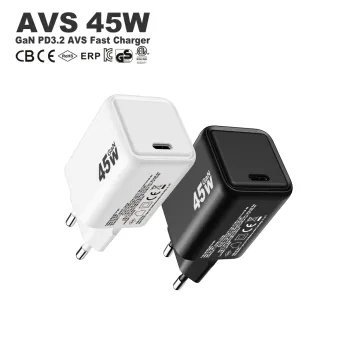
30W Desktop Charger
Suitable for:
• Smartphones
• Wireless earbuds
• Small accessories
Best for:
• Minimal desk setups
• Mobile users
Read More
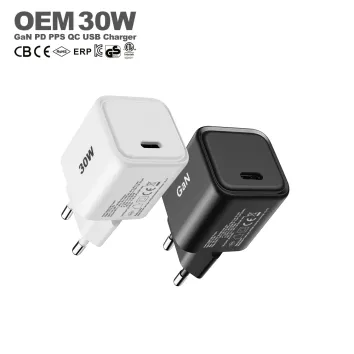
45W Desktop Charger
Suitable for:
• Tablets
• Lightweight laptops
• Smartphones
Best for:
• Students
• Basic office users
It delivers more precise voltage control and improved charging efficiency, making it ideal for modern smartphones and fast-charging ecosystems.
As a 30W charger manufacturer solution, this model is engineered for OEM projects, brand customization, and high-volume supply, combining stable performance with advanced protocol compatibility.
Read More
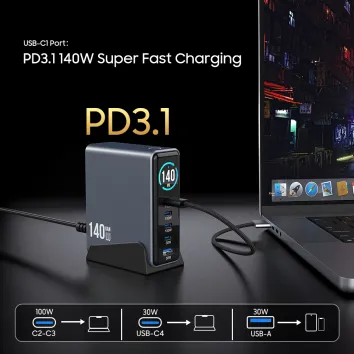
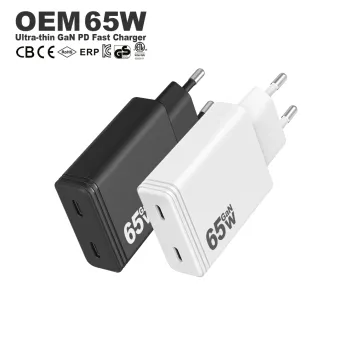
65W Desktop Charger
One of the most popular choices today.
Suitable for:
• MacBook-class laptops
• Tablets
• Smartphones
• Multiple accessories
Advantages:
• Good balance between size and power
• Supports most daily devices
• Portable enough for travel
A 65W GaN desktop charger is often considered the ideal all-purpose charging solution.
Read More
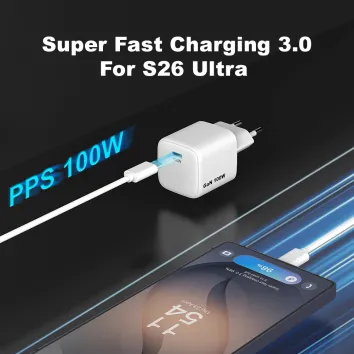
100W Desktop Charger
Suitable for:
• Professional laptops
• Multiple USB-C devices
• High-performance workstations
Benefits:
• Faster laptop charging
• Better multi-device support
• More charging flexibility
Read More
140W-240W Desktop Charger
Designed for advanced applications.
Suitable for:
• High-performance laptops
• Gaming devices
• Professional equipment
These high-power solutions typically use:
• GaN technology
• USB PD 3.1
• Advanced thermal design
Read More
Why GaN Desktop Chargers Are Becoming the Future
GaN technology has become one of the most important trends in the charging industry.
Traditional chargers use silicon-based power components.
While silicon technology is reliable, it has limitations when users require:
• Higher power
• Smaller size
• Better efficiency
GaN technology solves many of these challenges.
Advantages of GaN Desktop Chargers
1. Smaller Size
GaN components operate more efficiently and allow charger designers to reduce the size of internal components.
This creates:
• Smaller adapters
• Better portability
• Cleaner desk setups
2. Higher Power Density
Power density refers to how much power a charger can deliver compared with its physical size.
A GaN desktop charger can provide high output without becoming unnecessarily large.
For example:
A compact GaN charger can support:
• 65W laptop charging
• 100W multi-device charging
• 140W high-power charging
3. Better Heat Management
Heat is one of the biggest challenges in charger design.
GaN technology helps reduce energy loss, which can improve:
• Efficiency
• Temperature control
• Product reliability
4. Supports Modern Charging Standards
Modern GaN desktop chargers often support:
• USB PD / PD 3.1 / PPS / QC
These technologies allow chargers to work with a wide range of devices.
Desktop Charger Safety Features You Should Consider
A high-quality desktop charger should include multiple protection systems.
Important safety features include:
Over Current Protection (OCP)
Protects devices from excessive current.
Over Voltage Protection (OVP)
Prevents abnormal voltage output.
Over Temperature Protection (OTP)
Reduces risk caused by excessive heat.
Short Circuit Protection (SCP)
Protects both charger and connected devices.
Professional charger design combines:
• Hardware protection
• Intelligent control systems
• Quality components
• Safety testing
to ensure reliable charging performance.
Professional Charger Factory for Desktop Charging Solutions
For brands, distributors, and business customers, choosing the right charging partner is an important decision.
Zonsan is a professional charger factory and USB charger manufacturer specializing in:
• USB wall chargers
• GaN chargers
• PD fast chargers
• Desktop chargers
• Laptop chargers
• Customized charging solutions
With OEM and ODM capabilities, Zonsan supports global customers with:
• Product development
• Customized designs
• Logo and packaging solutions
• Certification support
• Mass production
Modern desktop charging requires more than just high output power. Product reliability, charging protocol compatibility, thermal design, and safety performance are equally important.
As charging technology continues to evolve, professional charger manufacturers play an important role in delivering reliable charging solutions for global markets.
How to Choose the Best Desktop Charger?
Before purchasing a desktop charger, consider these factors:
1. Check Your Device Power Requirements
Make a list of devices you charge daily.
For example:
Home office:
• Laptop
• Phone
• Earbuds
Recommended:
65W desktop charger
Professional workstation:
• Laptop
• Tablet
• Multiple accessories
Recommended:
100W+ desktop charger
2. Choose the Right Port Combination
Consider whether you need:
• USB-C only
• USB-C + USB-A
• Multiple USB-C ports
USB-C ports are recommended for future compatibility.
3. Consider GaN Technology
GaN chargers provide:
• Smaller size
• Better efficiency
• Higher power output
They are especially suitable for modern desk setups.
4. Check Certifications
For business and global markets, charger certifications are important.
Common certifications include:
• CE, RoHS, FCC, UKCA, CB, ETL, KC
Certified products provide better reliability and market acceptance.
Frequently Asked Questions About Desktop Chargers
Q1: What is the best charger for a desk setup?
The best desk charger depends on your devices. For most users, a 65W GaN desktop charger with USB-C PD support provides a good balance between power, size, and flexibility.
Q2: How many watts does a desk charger need?
A smartphone setup may only need 20W-30W, while laptops and multiple devices usually require 65W or higher.
Q3: Is a GaN charger better for desktop charging?
Yes. GaN chargers offer higher efficiency, smaller size, and better heat management compared with traditional silicon chargers.
Q4: Can one desktop charger charge a laptop and phone?
Yes. A multi-port USB-C PD desktop charger can charge laptops, smartphones, tablets, and accessories simultaneously.
Q5: What is the difference between a wall charger and a desktop charger?
A wall charger plugs directly into a socket, while a desktop charger is designed to sit on a desk and usually provides higher output and more ports.
Q6: How many ports should a desktop charger have?
For most users, 2-4 ports are enough. Professional workstations may benefit from more USB-C ports.
Q7: Is a 65W desktop charger enough for office use?
For most office setups, yes. A 65W charger can usually support a laptop, smartphone, and accessories.
Q8: What is the best USB-C desktop charger?
The best USB-C desktop charger should support PD fast charging, provide sufficient wattage, include safety protections, and match your device requirements.
Conclusion: Building a Better Desk Charging Setup
A modern desk requires more than just a basic charger.
With the increasing number of electronic devices used every day, a reliable desktop charger can help create a cleaner, more efficient, and more organized workspace.
The right desktop charger should provide:
• Enough power output
• USB-C PD compatibility
• Multiple charging ports
• Safe operation
• Compact design
For most users, a 65W GaN desktop charger offers an excellent balance between performance and convenience.
For professional users and multi-device setups, higher-power solutions such as 100W, 140W, or 240W GaN desktop chargers provide greater flexibility.
As a professional charger factory, Zonsan continues to develop advanced charging solutions, including GaN chargers, PD fast chargers, USB-C chargers, and desktop charging products for global customers.