Thunderbolt 5 vs USB4 vs USB-C: What's the Difference for Charging and Data in 2026?
• USB-C
• USB4
• Thunderbolt 4
• Thunderbolt 5
• PD3.1
• EPR cable
At first glance, they all look almost identical.
The connectors are usually the same.
The cables often look the same.
And many manufacturers market everything as simply: “USB-C.”
But behind that small reversible connector lies a surprisingly complicated ecosystem.
And in 2026, understanding the difference between:
• USB-C
• USB4
• Thunderbolt 5
is becoming increasingly important — especially for:
• laptop charging
• high-speed data transfer
• docking stations
• gaming setups
• creator workflows
• high-power GaN charging systems
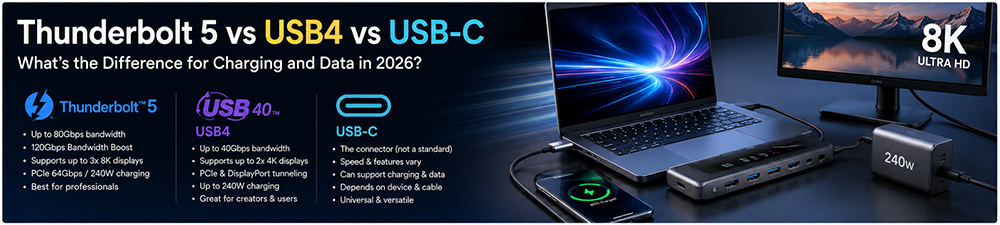
This is the most important concept many users misunderstand.
USB-C itself is NOT a speed standard.
It is only: a connector type.
That means:
a USB-C cable could support:
• slow charging
• fast charging
• basic USB2.0 data
• 40Gbps data
• 80Gbps data
• video output
• Thunderbolt
• PD3.1 charging
…or only some of those features.
This is why two USB-C cables may look identical externally while performing completely differently internally.
What Is USB4?
USB4 is a modern data and connectivity standard built around the USB-C connector.
It significantly improved:
• bandwidth
• display capability
• docking support
• protocol efficiency
compared to older USB versions.
USB4 was heavily influenced by Thunderbolt technology and brought many high-end features into mainstream USB ecosystems.
USB4 Key Features
USB4 commonly supports:
• up to 40Gbps transfer speed
• external displays
• PCIe tunneling
• docking stations
• high-speed SSDs
• USB PD charging
Many modern creator laptops now rely heavily on USB4 ports.
What Is Thunderbolt 5?
Thunderbolt 5 is Intel’s latest high-performance connectivity platform.
It represents a major leap beyond:
• USB4
• Thunderbolt 4
• older USB-C systems
Thunderbolt 5 dramatically increases:
• bandwidth
• display capability
• workstation performance
• docking flexibility
and high-performance creator workflows.
Thunderbolt 5 Speed: A Huge Jump
Thunderbolt 5 supports: up to 80Gbps bi-directional bandwidth.
In certain display-intensive scenarios, it can dynamically boost bandwidth even higher.
This is extremely important for:
• 8K displays
• multi-monitor setups
• AI workstations
• external GPUs
• ultra-fast storage systems
Why Thunderbolt 5 Matters for Creators
Modern content creation workloads are becoming massive.
Today's workflows involve:
• 8K video editing
• AI processing
• large RAW image files
• multi-camera production
• real-time rendering
These workloads require enormous bandwidth.
Thunderbolt 5 is designed specifically for these next-generation professional environments.
USB-C Charging vs Data: Two Different Things
One major source of confusion is that: charging capability and data capability are separate.
A cable may support:
• 240W charging
but only:
• USB2.0 data speeds
Meanwhile another cable may support:
• 80Gbps data
but only moderate charging power.
This is why cable selection has become increasingly complicated.
Why E-Marker Chips Matter More Than Ever
As charging and bandwidth increase, cables now require much smarter internal communication.
Modern high-end cables often include: E-Marker chips.
These chips communicate:
• power capability
• cable specifications
• supported current
• protocol compatibility
between devices.
Without proper E-Marker communication:
• charging speed may drop
• displays may fail
• docking stations may behave unpredictably
Why Some USB-C Cables Cannot Handle Thunderbolt 5
Many low-cost USB-C cables were designed for:
• phone charging
• basic accessories
• low-power usage
But Thunderbolt 5 pushes cable engineering much further.
High-bandwidth systems require:
• improved shielding
• lower signal loss
• tighter manufacturing tolerances
• better EMI protection
• higher-quality internal architecture
This is why true Thunderbolt 5 cables are typically more expensive.
Why Charging Becomes More Complex With Thunderbolt Ecosystems
Modern docking stations increasingly combine:
• charging
• displays
• storage
• networking
• accessories
through one USB-C cable.
This creates huge engineering demands.
One cable may simultaneously handle:
• 140W charging
• multiple monitors
• external SSDs
• audio interfaces
• network traffic
All at the same time.
This is one reason modern USB-C ecosystems are becoming much more sophisticated.
PD3.1 and Thunderbolt: The Future Combination
One of the biggest industry trends is the merging of:
• Thunderbolt ecosystems
• USB4 ecosystems
• PD3.1 charging
• GaN charging systems
Together, they create a future where:
• one cable
• one charger
• one docking station
can power an entire professional workstation.
This is especially attractive for:
• creators
• engineers
• gamers
• hybrid workers
• AI developers
Why Thermal Design Is Becoming a Bigger Challenge
As bandwidth and charging power increase simultaneously, heat management becomes critical.
High-end USB-C systems now generate heat from:
• charging current
• high-frequency signaling
• display transmission
• PCIe tunneling
• controller chips
This affects:
• cable lifespan
• connector reliability
• docking station stability
• charging performance
Modern charger and cable manufacturers increasingly invest in:
• thermal simulation
• shielding optimization
• connector durability
• PCB efficiency
• advanced cooling architecture
Why Many “USB-C Problems” Are Actually Cable Problems
This is one of the biggest misconceptions in modern electronics.
Users often blame:
• the laptop
• the charger
• the dock
when the real issue is: the cable.
A weak cable may cause:
• random disconnects
• display flickering
• slow SSD performance
• unstable charging
• monitor failures
• reduced charging wattage
This becomes especially common with:
• Thunderbolt docks
• gaming laptops
• creator workstations
• multi-monitor systems
ZONSAN's Perspective on High-Speed USB-C Ecosystems
As a professional GaN charger manufacturer and OEM fast charging supplier, Zonsan Power
closely follows the rapid evolution of USB4, PD3.1, and next-generation USB-C ecosystems.
The future of charging is no longer limited to power adapters alone.
Real ecosystem performance increasingly depends on:
• cable engineering
• protocol stability
• thermal management
• intelligent power negotiation
• connector reliability
For applications such as:
• desktop GaN charging stations
• MacBook charging
• gaming laptop charging
• creator workstation charging
• multi-port PD chargers
future-ready USB-C ecosystem design is becoming a key competitive advantage.
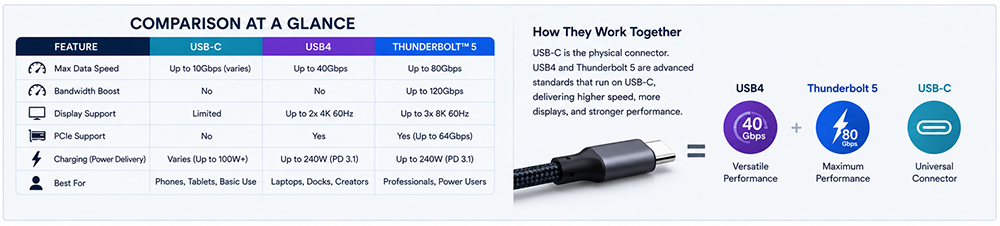
USB-C vs USB4 vs Thunderbolt 5 Comparison
Which One Should You Choose?
USB-C
Good for:
• phones / tablets / general charging
USB4
Best balance for:
• creators / docking stations / modern laptops / fast storage
Thunderbolt 5
Ideal for:
• professional creators / AI workflows / 8K editing / extreme workstation setups
Final Thoughts
USB-C technology has evolved far beyond a simple charging connector.
Today's ecosystem combines:
• charging
• data
• displays
• storage
• workstation connectivity
into one unified platform.
Understanding the difference between:
• USB-C
• USB4
• Thunderbolt 5
is increasingly important as modern devices demand:
• higher charging power
• faster bandwidth
• smarter docking systems
• universal connectivity
And as PD3.1 and GaN charging continue evolving, the future of USB-C ecosystems will become even more powerful, integrated, and intelligent.
Read more about USB PD3.1
• “USB-C PD3.1 and EPR Charging Explained”↗
• “Why Some USB-C Cables Cannot Charge Laptops Properly”↗
• “USB4 Specification Overview”↗
• “Thunderbolt Technology Overview”↗
FAQ (People Also Ask)
Q1: Is USB-C the same as USB4?
No. USB-C is a connector type, while USB4 is a data and protocol standard.
Q2: Is Thunderbolt 5 faster than USB4?
Yes. Thunderbolt 5 supports significantly higher bandwidth and advanced workstation features.
Q3: Can USB4 support charging?
Yes. USB4 commonly supports USB Power Delivery charging.
Q4: Do I need a special cable for Thunderbolt 5?
Yes. Thunderbolt 5 requires high-quality certified cables for full performance.
Q5: Can USB-C support 240W charging?
Yes. USB PD3.1 with EPR enables USB-C charging up to 240W.
Q6: Why are some USB-C cables slow?
Some cables only support low-speed data or lower charging capability.
Q7: Does Thunderbolt 5 improve charging speed?
Charging depends mainly on PD standards and charger capability, not only Thunderbolt itself.
Q8: Are all USB-C ports Thunderbolt compatible?
No. Many USB-C ports support only basic USB functionality.
Read More
| Feature | USB-C | USB4 | Thunderbolt 5 |
| Connector Type | Yes | USB-C | USB-C |
| Max Data Speed | Varies | 40Gbps | 80Gbps |
| Display Support | Limited | Strong | Advanced |
| Laptop Charging | Yes | Yes | Yes |
| PD3.1 Support | Possible | Yes | Yes |
| Docking Capability | Basic | Advanced | Professional |
| Gaming / Creator Workloads | Limited | Good | Excellent |
Which One Should You Choose?
USB-C
Good for:
• phones / tablets / general charging
USB4
Best balance for:
• creators / docking stations / modern laptops / fast storage
Thunderbolt 5
Ideal for:
• professional creators / AI workflows / 8K editing / extreme workstation setups
Final Thoughts
USB-C technology has evolved far beyond a simple charging connector.
Today's ecosystem combines:
• charging
• data
• displays
• storage
• workstation connectivity
into one unified platform.
Understanding the difference between:
• USB-C
• USB4
• Thunderbolt 5
is increasingly important as modern devices demand:
• higher charging power
• faster bandwidth
• smarter docking systems
• universal connectivity
And as PD3.1 and GaN charging continue evolving, the future of USB-C ecosystems will become even more powerful, integrated, and intelligent.
Read more about USB PD3.1
• “USB-C PD3.1 and EPR Charging Explained”↗
• “Why Some USB-C Cables Cannot Charge Laptops Properly”↗
• “USB4 Specification Overview”↗
• “Thunderbolt Technology Overview”↗
FAQ (People Also Ask)
Q1: Is USB-C the same as USB4?
No. USB-C is a connector type, while USB4 is a data and protocol standard.
Q2: Is Thunderbolt 5 faster than USB4?
Yes. Thunderbolt 5 supports significantly higher bandwidth and advanced workstation features.
Q3: Can USB4 support charging?
Yes. USB4 commonly supports USB Power Delivery charging.
Q4: Do I need a special cable for Thunderbolt 5?
Yes. Thunderbolt 5 requires high-quality certified cables for full performance.
Q5: Can USB-C support 240W charging?
Yes. USB PD3.1 with EPR enables USB-C charging up to 240W.
Q6: Why are some USB-C cables slow?
Some cables only support low-speed data or lower charging capability.
Q7: Does Thunderbolt 5 improve charging speed?
Charging depends mainly on PD standards and charger capability, not only Thunderbolt itself.
Q8: Are all USB-C ports Thunderbolt compatible?
No. Many USB-C ports support only basic USB functionality.
Read More