Can You Charge Your Phone With a Laptop Charger?
Personnel: Operations: Ken and Charger Engineer: Luke
With the growing prevalence of USB-C charging ports across devices, the question of whether a laptop charger can safely charge your phone has become increasingly relevant. In this article, we’ll explore whether this is possible, the potential risks, and how to optimize the process for safe and efficient charging.
A Charger Manufacturer's Perspective
From a consumer's perspective, using a laptop charger to charge a phone seems simple: plug the cable into the phone and start charging. From a charger manufacturer's and engineer's perspective, however, several systems work together before power is actually delivered.
A modern USB-C charger does not simply push its maximum rated wattage into every connected device. Instead, the charger, cable, and device work together to determine an appropriate charging condition.
Engineers typically consider:
1. charger output capability
2. USB-C Power Delivery negotiation
3. supported voltage and current levels
4. charging protocol compatibility
5. cable capability
6. thermal conditions
7. device-side charging limits
8. power management behavior
This is why a 65W laptop charger can be used with a phone that only requires 20W, 25W, 30W, or another lower power level. The 65W rating describes the charger's maximum supported output capability under specified conditions, not the amount of power that the phone is forced to consume.

1. Is It Possible to Charge a Phone With a Laptop Charger?
Yes, you can charge your phone using a laptop charger if both devices use a USB-C port. Modern laptop chargers, such as 45W or 65W USB-C PD chargers, are designed to be versatile and can detect the power requirements of the connected device. They automatically adjust the power output to match what your phone needs.
For instance, a MacBook USB-C charger or a Dell 65W USB-C PD charger will work seamlessly with most smartphones, such as iPhones or Samsung Galaxy devices.
How Does a USB-C Laptop Charger Know How Much Power a Phone Needs?
This is one of the most important concepts to understand when using a laptop charger with a phone. USB-C Power Delivery charger can offer different power levels rather than continuously delivering its maximum rated output.
For example, a USB-C PD charger may support several output capabilities such as: 5V, 9V, 12V, 15V, and 20V, depending on its design and rated power.
The connected device can request an appropriate power level through the charging protocol.
Therefore: A 65W charger does not automatically charge every device at 65W. If a phone only supports a lower charging power, the phone's charging system will determine the appropriate power level.
Example Imagine you have:
a 65W USB-C PD laptop charger
a smartphone that supports up to 30W wired charging
a suitable USB-C cable
The charger may be capable of supplying up to 65W, but the phone does not necessarily consume 65W. The phone and charger establish a compatible charging condition, and the phone's charging system controls how much power it actually accepts. This power negotiation is one of the reasons USB-C PD chargers can be used across multiple device categories.
Charger Wattage vs. Actual Charging Power
This distinction is particularly important for B2B buyers and product developers. A charger specification such as: "65W USB-C PD Charger", means the charger has a maximum rated output capability under its specified operating conditions.
It does not mean every connected device receives 65W. Actual charging power can be affected by: phone model, battery state, charging protocol, charger output profile, cable capability, temperature, device power management, and simultaneous use of other charger ports.
For this reason, charger engineers evaluate both the charger's maximum output capability and its behavior with different types of loads.
2. Is It Safe?
Laptop chargers are generally safe for charging phones, provided the charger is of high quality and certified. However, there are a few considerations:
·Overcharging Concerns: High-wattage chargers may seem intimidating, but modern smartphones have built-in mechanisms to regulate incoming power, ensuring safety.
·Heat Management: Charging your phone with a laptop charger might generate more heat than a standard phone charger. Avoid charging in hot environments or while using demanding apps.
Key Tip: Use reputable, certified chargers like a 65W GaN charger or a 30W USB-C charger from trusted brands.
Why a Higher-Wattage Charger Does Not Automatically Mean Higher Charging Power
One common misunderstanding is: "My phone supports 25W, but I'm using a 100W charger. Will the 100W charger damage my phone?"
For a properly designed and compatible USB-C PD charging system, the answer is generally no.
The charger's maximum wattage is not automatically forced into the phone. The charging system is designed around controlled power negotiation and device-side power management.
For engineers, safety depends on much more than the wattage printed on the charger. A charger design must also consider:
• over-voltage protection
• over-current protection
• over-temperature protection
• short-circuit protection
• input and output isolation
• thermal management
• component reliability
• abnormal operating conditions
This is why two chargers with the same "65W" label can have very different engineering and quality levels.
What Does a Charger Manufacturer Check During Development?
For a professional charger manufacturer, safety evaluation is not limited to checking whether a charger can reach its advertised wattage.
Depending on the product and market, engineers may evaluate:
Electrical performance: input voltage range, output voltage regulation, output current,power delivery behavior, ripple and noise.
Thermal performance: component temperature, enclosure temperature, temperature rise under load, long-duration operation.
Protection functions: over-current protection, over-voltage protection, short-circuit protection, over-temperature protection.
Reliability: aging tests, load testing, repeated operating conditions, abnormal-condition testing.
These engineering checks help ensure that a charger is suitable not only for laboratory conditions but also for repeated everyday use.
One common misunderstanding is: "My phone supports 25W, but I'm using a 100W charger. Will the 100W charger damage my phone?"
For a properly designed and compatible USB-C PD charging system, the answer is generally no.
The charger's maximum wattage is not automatically forced into the phone. The charging system is designed around controlled power negotiation and device-side power management.
For engineers, safety depends on much more than the wattage printed on the charger. A charger design must also consider:
• over-voltage protection
• over-current protection
• over-temperature protection
• short-circuit protection
• input and output isolation
• thermal management
• component reliability
• abnormal operating conditions
This is why two chargers with the same "65W" label can have very different engineering and quality levels.
What Does a Charger Manufacturer Check During Development?
For a professional charger manufacturer, safety evaluation is not limited to checking whether a charger can reach its advertised wattage.
Depending on the product and market, engineers may evaluate:
Electrical performance: input voltage range, output voltage regulation, output current,power delivery behavior, ripple and noise.
Thermal performance: component temperature, enclosure temperature, temperature rise under load, long-duration operation.
Protection functions: over-current protection, over-voltage protection, short-circuit protection, over-temperature protection.
Reliability: aging tests, load testing, repeated operating conditions, abnormal-condition testing.
These engineering checks help ensure that a charger is suitable not only for laboratory conditions but also for repeated everyday use.

3. Benefits of Using a Laptop Charger
·Convenience: One charger for multiple devices reduces clutter, especially for travelers.
·Fast Charging: Laptop chargers often support Power Delivery (PD), enabling quick charging for compatible smartphones.
·Universal Compatibility: High-quality chargers are designed for diverse devices, from laptops to phones.
Why Multi-Device Charging Is Becoming More Important
The shift toward USB-C has changed how consumers and businesses think about chargers. Instead of carrying separate chargers for: laptop, smartphone, tablet, earbuds, and portable gaming devices; one USB-C PD charger can potentially support several categories of products.
This is particularly important for: business travelers / office users / remote workers / consumers with multiple USB-C devices / retailers / corporate gifting programs / B2B charger brands.
For a charger manufacturer, however, "one charger for everything" creates additional engineering requirements.
A multi-purpose charger must balance: total output power, port allocation, thermal performance, charging protocol support, size, efficiency, and user experience.
4. Potential Drawbacks
While charging your phone with a laptop charger is possible, there are some caveats:
·Inefficiency With Non-USB-C Devices: If your phone doesn’t support USB-C, you’ll need an adapter, which can slow down charging.
·Port Damage Risks: Repeated use of large, heavy-duty cables in a phone’s small charging port may cause wear and tear over time.
The Cable Is Also Part of the Charging System
The charger is only one part of the system. For USB-C charging, engineers and product developers need to consider: Charger + Cable + Device
A high-power USB-C charger paired with an unsuitable cable may not deliver the expected charging performance.
The choice of cable will affect the supported current, voltage drop, charging power, cable temperature, and USB-C PD operating characteristics.
For higher-power USB-C applications, cable specifications become increasingly important. Some high-power USB-C cables use an E-marker to identify their capabilities to the connected system.
This is especially relevant for laptop charging and high-power USB-C PD applications.
Why Cable Quality Matters in B2B Charger Development
For a consumer purchasing a charger, the cable may seem like a simple accessory. For a charger manufacturer, it is part of the complete charging solution.
When developing OEM charger kits, engineers typically need to evaluate factors such as charger output capacity, cable current carrying capacity, connector quality, contact resistance, voltage drop, cable temperature, and compatibility with the target device.
Furthermore, the above considerations are particularly important when developing the following high-power products: 65W USB-C chargers, 100W USB-C PD chargers, 140W USB-C chargers or multi-port desktop chargers.
·Convenience: One charger for multiple devices reduces clutter, especially for travelers.
·Fast Charging: Laptop chargers often support Power Delivery (PD), enabling quick charging for compatible smartphones.
·Universal Compatibility: High-quality chargers are designed for diverse devices, from laptops to phones.
Why Multi-Device Charging Is Becoming More Important
The shift toward USB-C has changed how consumers and businesses think about chargers. Instead of carrying separate chargers for: laptop, smartphone, tablet, earbuds, and portable gaming devices; one USB-C PD charger can potentially support several categories of products.
This is particularly important for: business travelers / office users / remote workers / consumers with multiple USB-C devices / retailers / corporate gifting programs / B2B charger brands.
For a charger manufacturer, however, "one charger for everything" creates additional engineering requirements.
A multi-purpose charger must balance: total output power, port allocation, thermal performance, charging protocol support, size, efficiency, and user experience.
4. Potential Drawbacks
While charging your phone with a laptop charger is possible, there are some caveats:
·Inefficiency With Non-USB-C Devices: If your phone doesn’t support USB-C, you’ll need an adapter, which can slow down charging.
·Port Damage Risks: Repeated use of large, heavy-duty cables in a phone’s small charging port may cause wear and tear over time.
The Cable Is Also Part of the Charging System
The charger is only one part of the system. For USB-C charging, engineers and product developers need to consider: Charger + Cable + Device
A high-power USB-C charger paired with an unsuitable cable may not deliver the expected charging performance.
The choice of cable will affect the supported current, voltage drop, charging power, cable temperature, and USB-C PD operating characteristics.
For higher-power USB-C applications, cable specifications become increasingly important. Some high-power USB-C cables use an E-marker to identify their capabilities to the connected system.
This is especially relevant for laptop charging and high-power USB-C PD applications.
Why Cable Quality Matters in B2B Charger Development
For a consumer purchasing a charger, the cable may seem like a simple accessory. For a charger manufacturer, it is part of the complete charging solution.
When developing OEM charger kits, engineers typically need to evaluate factors such as charger output capacity, cable current carrying capacity, connector quality, contact resistance, voltage drop, cable temperature, and compatibility with the target device.
Furthermore, the above considerations are particularly important when developing the following high-power products: 65W USB-C chargers, 100W USB-C PD chargers, 140W USB-C chargers or multi-port desktop chargers.

5. How to Choose the Right Charger for Dual Use?
To maximize compatibility and performance, look for these features when selecting a laptop charger:
·GaN Technology: Chargers like GaN 65W or 100W USB-C chargers are compact, efficient, and generate less heat.
·PD Compatibility: Ensure your charger supports Power Delivery, which is essential for fast charging both laptops and phones.
·Certifications: Choose chargers with CE, FCC, or RoHS certifications to ensure safety and compliance with international standards.
From an Charger Factory Engineer's Perspective: What Should You Check?
For ordinary consumers, a simple power comparison may be sufficient, but for B2B buyers, OEM customers, and charger brands, the selection of a charger requires consideration of more factors.
Before selecting a dual-use laptop and phone charger, consider:
1. Maximum Output Power
Determine whether the charger can support the intended laptop.
For example, a laptop may require significantly more power than a smartphone.
A charger should therefore be selected according to the highest intended load, while also supporting lower-power devices.
2. USB-C PD Profiles
Check which USB-C PD output profiles the charger supports.
Different devices may request different voltage and current combinations.
3. PPS Support
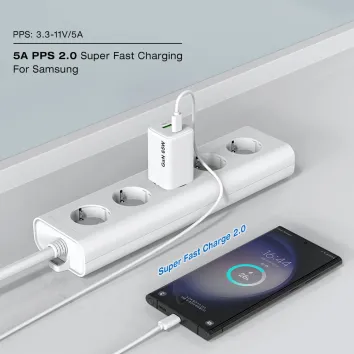
For products targeting smartphones (Samsung, Google Pixel, Xiaomi, OPPO, Vivo, and mobile devices etc.) with advanced fast-charging requirements, PPS support can also be important.
Programmable Power Supply allows compatible devices and chargers to adjust voltage more dynamically within supported ranges. However, not every phone requires PPS, so the target device list should be considered during product development.
4. Number of Ports
A single-port charger behaves differently from a multi-port charger. When multiple devices are connected, engineers need to determine how total power is distributed.
For example: 100W total output does not necessarily mean 100W + 100W from two ports.
The actual allocation depends on the charger's architecture and output specification.
5. Thermal Design
Higher power in a compact enclosure requires careful thermal management.
Charger Manufacturer Engineers evaluate: component heat, generation, airflow, PCB layout, enclosure design, efficiency, temperature rise.
This is particularly important for compact GaN chargers.
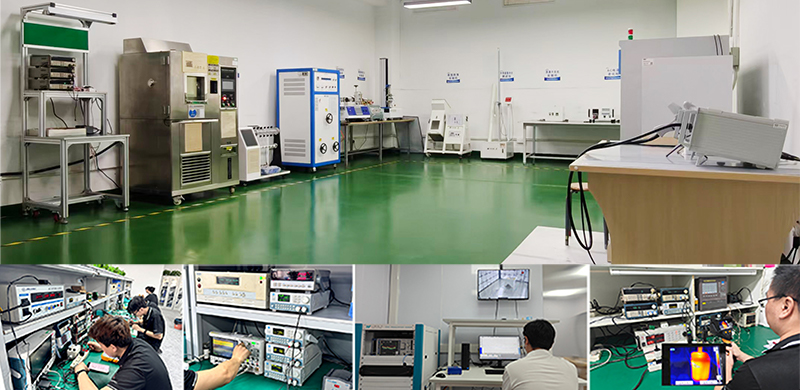
How a Charger Factory Tests a Laptop Charger for Phone and Laptop Use
For a B2B charger manufacturer, a dual-use charger needs to be evaluated with more than one type of device. A typical engineering verification process may include different load conditions.
For example, engineers may evaluate:
For a B2B charger manufacturer, a dual-use charger needs to be evaluated with more than one type of device. A typical engineering verification process may include different load conditions.
For example, engineers may evaluate:
| Test Area | What Engineers Check |
| No-load | Standby behavior |
| Low-power load | Stability at low output |
| Medium load | Normal operating performance |
| Full load | Maximum rated output |
| Multi-port load | Power distribution |
| Thermal test | Temperature rise |
| Ripple test | Output stability |
| Aging test | Long-term operation |
The exact test conditions depend on the charger model, rated power, target market and applicable requirements.
Example: A 65W Charger Used for Both Laptop and Phone
Consider a 65W USB-C PD charger (ZX-2U73T: 1A1C 65W).
The product may be designed to support: laptop charging, smartphone charging, tablet charging, USB-C accessories.
The engineering challenge is not simply achieving 65W. The charger should also maintain stable performance when the load changes.
Scenario 1: Phone only
The phone requests a compatible lower-power charging condition.
Scenario 2: Laptop only
The laptop requests a higher-power profile supported by the charger.
Scenario 3: Device transitions between charging states
The charger must respond correctly as the device changes its power requirements.
This is why engineers test chargers under multiple operating conditions rather than relying on one maximum-power measurement.
Read More
Why GaN Is Useful for Laptop-and-Phone Chargers
GaN, or gallium nitride, has become an important technology for compact high-power chargers. Compared with conventional silicon-based power solutions, GaN technology can enable high-frequency switching and compact power designs when properly engineered.
This helps manufacturers develop smaller 65W chargers, compact 100W chargers, high-power travel chargers, and multi-device chargers. However, GaN itself does not automatically guarantee a better charger.
The complete product still depends on:
1. power architecture 2. component selection 3. PCB design 4. thermal management 5. firmware/control strategy 6. manufacturing quality 7. testing
From an charger engineering perspective: GaN is a technology platform, not a substitute for good charger design.
What B2B Buyers Should Ask a Charger Manufacturer
If you are purchasing chargers for a brand, retail business or OEM project, do not evaluate a laptop charger only by its wattage.
Ask the charger manufacturer:
Power
1. What is the maximum output?
2. What USB-C PD profiles are supported?
3. Does the charger support PPS?
4. How does the charger distribute power between multiple ports?
Compatibility
1. Which laptops have been tested?
2. Which smartphone platforms have been tested?
3. Are USB-C PD and other required protocols supported?
Safety
1. What protection functions are included?
2.What certifications are available for the target market?
Reliability
1. Is aging testing performed?
2.Is thermal testing performed?
3. Is output ripple tested?
4. How is production consistency controlled?
Customization — For OEM ODM Charger projects, also consider:
plug type and target-market certification; logo customization; packaging; output configuration; enclosure design; firmware or protocol requirements.
A professional B2B charger supplier should be able to discuss these topics with your engineering or purchasing team.
6. Alternatives to Laptop Chargers
If you're worried about using your laptop charger for your phone, consider these alternatives:
·Universal Travel Chargers: Compact, multi-port chargers for charging multiple devices.
·Portable Chargers: Ideal for on-the-go power needs without relying on a wall socket.
Laptop Charger vs. Phone Charger: What Is Actually Different?
The biggest difference is not necessarily the physical charger size. It is the intended power range and output architecture.
| Feature | Laptop Charger | Phone Charger |
| Typical power requirement | Higher | Lower |
| USB-C PD | Common | Increasingly common |
| High-power output | Common | Depends on phone |
| PPS | Product dependent | Common on some fast-charging platforms |
| Multi-device use | Increasingly common | Increasingly common |
| GaN technology | Common in compact models | Common in premium models |
This convergence is one of the major reasons USB-C has become so important in charger product development.
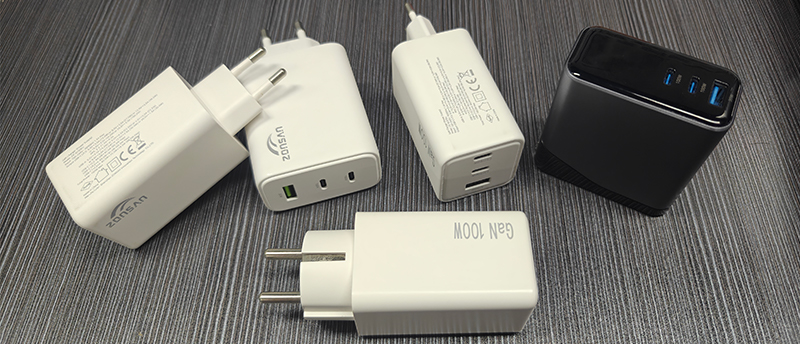
Does a 100W Charger Charge a Phone Faster Than a 30W Charger?
Not necessarily. If the phone's maximum supported charging power is around 30W under a particular charging condition, switching to a 100W charger does not automatically increase the phone's charging power to 100W.
The actual charging speed depends on the complete charging system (The charger structure, protocol, cables, temperature, etc. mentioned above). This is why a higher-wattage charger should not be marketed simply as "faster" for every device.
In layman's terms:
A high-power charger (100W) can receive a larger current.
↓
The charging cable is the channel for the current (low-wattage data cables limit current delivery).
↓
The phone/device's protocol ultimately determines how much current it can receive.
What Happens When the Phone Is Almost Fully Charged?
Notice! Charging power is not necessarily constant throughout the entire charging cycle. A smartphone may reduce charging power as the battery approaches a high state of charge.
This helps manage: battery temperature, charging behavior, battery longevity, overall system safety
Therefore, even if a phone and charger support a certain peak charging power, users should not expect that power level to remain constant from 0% to 100%.
For charger engineers, this means charger performance should be considered across different operating states rather than at only one moment of peak output.
Why Charger Quality Matters More Than the Number on the Label
Importance!!! Two chargers can both be labeled "65W" while having very different internal designs.
A professional PD gallium nitride (GaN) charger design considers a number of key factors, such as the quality of all components, PDB design, conversion efficiency, thermal management, current safety, stability, and manufacturing consistency.
For consumers, individual buyers, or B2B buyers, the differences in component quality and technology of these chargers are crucial.
A Practical Checklist Before Using a Laptop Charger With Your Phone
Before connecting your phone to a laptop charger, check:
□ The charger is from a reputable manufacturer.
□ The charger supports a compatible charging protocol.
□ The cable is suitable for the intended charging power.
□ The charger and cable are undamaged.
□ The phone and charger connectors are clean and properly seated.
□ The charger does not show abnormal overheating.
□ There is no burning smell, crackling or visible damage.
If the charger behaves abnormally, discontinue use and have the product inspected or replaced.
Summarize
Charging your phone with a laptop charger is not only possible but also efficient, provided you use a high-quality, certified charger. Always ensure compatibility with your phone’s charging protocol and be mindful of potential risks like overheating or port damage.
Use high quality fast chargers like 100W USB-C PD chargers or 45W GaN chargers, you can enjoy fast, safe charging for all your devices without compromising performance or safety.
Final Thoughts From a Charger Manufacturer
A laptop charger and a phone charger are no longer necessarily two completely different products.
With the widespread adoption of USB-C and Power Delivery, one well-designed charger can support laptops, smartphones, tablets and other compatible devices. However, the key is not simply choosing the charger with the highest wattage.
The complete charging system matters: Charger + Cable + Device + Charging Protocol + Thermal Management
For consumers, this means choosing a reputable and compatible charger.
For B2B buyers and brands, it means selecting a charger manufacturer that can demonstrate expertise in: power electronics, USB-C PD, GaN technology, thermal engineering, charger testing, quality control, OEM customization, mass-production consistency.
A high-quality 65W, 100W or higher-power USB-C charger should be engineered not only to deliver power, but to deliver it safely, consistently and efficiently across the devices it is designed to support.
Suggested Reading from Our Blog
• What Is a GaN Charger and How Does It Work?
• USB-C PD Charging Explained
• 3A vs. 5A vs. 6A Charging Cables
• How to Choose a 65W USB-C Charger
• GaN 1 vs. GaN 2 vs. GaN 3: Understanding the Differences
Reviewed by: Zonsan R&D team, Luke and Miller
Technical Review: Charger Problem & Power Solutions
Last reviewed: [August 27, 2026]