Understanding Chargers and Cables: What are 3A charging cables, 5A charging cables, and 6A charging cables? Relationship with chargers
Have you ever grabbed a cable or charger and thought, "Wait, what does 5A mean again?" Or maybe your phone gets hot when charging and you're wondering if it's the cable, the charger, or just your phone screaming for a break.
If you're in the business of tech—whether you're a retailer, brand, e-commerce seller, or in phone charger wholesale—knowing your amps, connectors, and charger types isn't just nice to have. It's essential. This guide is your go-to resource to make smart charging decisions (with zero technical fluff).
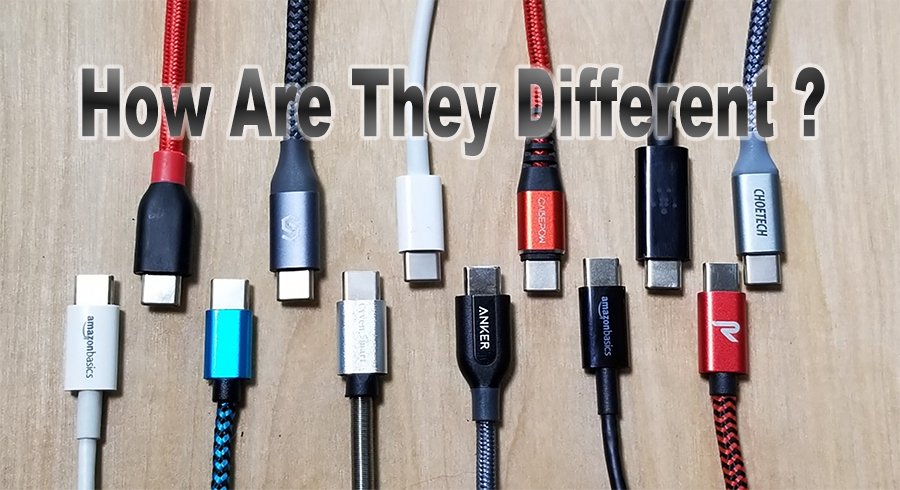
🔌 3A vs 5A vs 6A Charging Cables — What Do These Numbers Mean?
You've seen them: 3A cables, 5A cables, 6A cables. But what is 3A? What is 5A? What is 6A?
In simple terms, these numbers refer to the amperage—the amount of current a cable can safely handle. The higher the amperage, the faster the charging (if your device and charger support it).
What Does 3A, 5A, or 6A Actually Mean for Charging Power?
The amp rating of a cable describes its current capability. However, amperage alone does not determine charging speed.
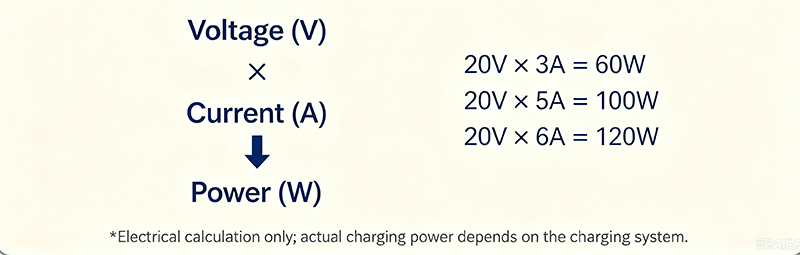
Electrical power is calculated using:
Power (W) = Voltage (V) × Current (A)
For example:
| Current | At 5V | At 9V | At 15V | At 20V |
| 3A | 15W | 27W | 45W | 60W |
| 5A | 25W | 45W | 75W | 100W |
| 6A | 30W | 54W | 90W | 120W+ |
*120W is a mathematical example at 20V and 6A. It should not be interpreted as a universal USB-C or USB Power Delivery rating.
This distinction is important because a cable's current rating tells you what the cable is designed to handle, while the actual charging power depends on the charger, cable, charging protocol, and device working together.
For example, connecting a 100W charger to a smartphone that only supports 25W does not make the phone charge at 100W.
This distinction is important because a cable's current rating tells you what the cable is designed to handle, while the actual charging power depends on the charger, cable, charging protocol, and device working together.
For example, connecting a 100W charger to a smartphone that only supports 25W does not make the phone charge at 100W.
The simple rule
A higher-current cable provides greater electrical capacity, but it does not automatically make every device charge faster.
3A vs 5A vs 6A: A Quick Comparison
| Cable Rating | Example at 20V | Typical Position | What to Check |
| 3A | Up to 60W | Everyday charging | Device power requirement |
| 5A | Up to 100W | Higher-power USB-C applications | Charger, device and cable capability |
| 6A | 120W at 20V* | Certain high-current charging systems | Specific protocol and cable specification |
*Electrical calculation only. A “6A” label does not by itself guarantee 120W operation.
The most important thing is not to choose the cable with the largest number simply because it looks more powerful.
Instead, match the cable to the actual requirements of the complete charging system.
3A vs 5A Charging Cables: What's the Real Difference?
A 3A cable and a 5A cable can look almost identical from the outside, especially when they use the same USB-C connector.
The major difference is their designed current capability.
At a 20V operating point: 3A × 20V = 60W
while: 5A × 20V = 100W
This is why 5A-capable cables are commonly relevant to 100W-class charging applications.
However, a 5A cable is not automatically “better” for every user.
A 3A cable may be suitable when:
• the device requires lower power
• the charging system does not require more than 3A
• the target application is smartphones, tablets or other lower-power devices
• the cable specification matches the charger and device
A 5A cable becomes more relevant when:
• higher-power USB-C charging is required
• the target system operates at a higher current
• a 100W-class charging application is being designed
• the charger and device support the required charging mode
The right cable is not necessarily the highest-rated cable. It is the cable that correctly matches the charging system.
✅ 3A Charging Cables: The Everyday Hero
·What is 3A? 3 Amps of current.
·Output: Up to 60W (at 20V).
·Best for: Phones, tablets, earbuds.
·Common use: Think of it as the Toyota Corolla of cables. Reliable, widely compatible.
⏳ Limitation: Slower when charging high-capacity devices.
What Can a 3A Cable Actually Support?
At 20V, a 3A cable corresponds to a theoretical power level of: 20V × 3A = 60W
This is why 3A cables are commonly associated with charging applications around the 60W range.
However, the actual charging power is determined by the complete system.
A 3A cable may be suitable for:
• smartphones
• tablets
• earbuds and accessories
• lower-power USB-C devices
• some laptop charging applications
The key point is that 3A does not automatically mean “60W in every situation.”
The operating voltage, charging protocol, device capability and charger output all matter.
✅ 5A Charging Cables: The Mid-Range Charger Rocket
·What is 5A? 5 Amps = up to 100W.
·Common types: 5A USB C cables, USB Type C 5A cable, Type C cable 5A.
·Used for: Laptops, tablets, phones with fast-charging support like Motorola’s fast charging feature.
💡 Bonus: Great when paired with a 65 watt charging cable or 100 watt charging cable.
Why Is 5A Important for 100W-Class Charging?
At 20V: 20V × 5A = 100W
This simple calculation explains why 5A-capable cables are commonly associated with 100W-class USB-C charging.
But a 100W charger does not automatically mean that every device connected to it will receive 100W.
Actual charging power can be limited by:
• the device's maximum charging input
• the charger's output capability
• the negotiated charging protocol
• the cable's current capability
• thermal conditions
• the battery's current charging state
For this reason, the charger, cable and device should always be evaluated as a complete system.
✅ 6A Charging Cables: Power Overload (in a good way)
·What is 6A? 6 Amps = ultra-fast charging, typically up to 120W+.
·Use case: Gamers, high-performance devices.
·Example: If you’re using a 6A charging cable with the right charger, say goodbye to 2-hour waits.
📌 But remember, your charger input types must support this output—or it's like trying to run a sports car on bicycle tires.
What About 6A Charging Cables?
A 6A cable requires a little more explanation than simply saying “6A equals 120W.”
The calculation is straightforward: 20V × 6A = 120W
However, this is only an electrical example at a specific voltage.
A cable labeled 6A should not automatically be assumed to provide 120W to every USB-C device.
High-current charging systems can differ in:
• charging protocol / charger architecture / device requirements / connector design / cable construction / current control / certification requirements
Some high-current charging technologies are proprietary or manufacturer-specific rather than simply being a universal USB-C power rating.
Important takeaway — Always evaluate a 6A cable together with the charger, device and charging protocol.
The number printed on the cable is only one part of the specification.
Can a 3A USB-C Cable Support 100W?
This is one of the most common questions when comparing USB-C charging cables.
At 20V: 3A × 20V = 60W
To reach 100W at 20V: 100W ÷ 20V = 5A
So a 3A cable should not simply be treated as a 100W cable at a 20V operating point.
However, the complete charging system still matters.
The charger must provide the required voltage and power, the device must support the corresponding charging mode, and the cable must have the appropriate electrical capability.
Simple example
Instead, match the cable to the actual requirements of the complete charging system.
3A vs 5A Charging Cables: What's the Real Difference?
A 3A cable and a 5A cable can look almost identical from the outside, especially when they use the same USB-C connector.
The major difference is their designed current capability.
At a 20V operating point: 3A × 20V = 60W
while: 5A × 20V = 100W
This is why 5A-capable cables are commonly relevant to 100W-class charging applications.
However, a 5A cable is not automatically “better” for every user.
A 3A cable may be suitable when:
• the device requires lower power
• the charging system does not require more than 3A
• the target application is smartphones, tablets or other lower-power devices
• the cable specification matches the charger and device
A 5A cable becomes more relevant when:
• higher-power USB-C charging is required
• the target system operates at a higher current
• a 100W-class charging application is being designed
• the charger and device support the required charging mode
The right cable is not necessarily the highest-rated cable. It is the cable that correctly matches the charging system.
✅ 3A Charging Cables: The Everyday Hero
·What is 3A? 3 Amps of current.
·Output: Up to 60W (at 20V).
·Best for: Phones, tablets, earbuds.
·Common use: Think of it as the Toyota Corolla of cables. Reliable, widely compatible.
⏳ Limitation: Slower when charging high-capacity devices.
What Can a 3A Cable Actually Support?
At 20V, a 3A cable corresponds to a theoretical power level of: 20V × 3A = 60W
This is why 3A cables are commonly associated with charging applications around the 60W range.
However, the actual charging power is determined by the complete system.
A 3A cable may be suitable for:
• smartphones
• tablets
• earbuds and accessories
• lower-power USB-C devices
• some laptop charging applications
The key point is that 3A does not automatically mean “60W in every situation.”
The operating voltage, charging protocol, device capability and charger output all matter.
✅ 5A Charging Cables: The Mid-Range Charger Rocket
·What is 5A? 5 Amps = up to 100W.
·Common types: 5A USB C cables, USB Type C 5A cable, Type C cable 5A.
·Used for: Laptops, tablets, phones with fast-charging support like Motorola’s fast charging feature.
💡 Bonus: Great when paired with a 65 watt charging cable or 100 watt charging cable.
Why Is 5A Important for 100W-Class Charging?
At 20V: 20V × 5A = 100W
This simple calculation explains why 5A-capable cables are commonly associated with 100W-class USB-C charging.
But a 100W charger does not automatically mean that every device connected to it will receive 100W.
Actual charging power can be limited by:
• the device's maximum charging input
• the charger's output capability
• the negotiated charging protocol
• the cable's current capability
• thermal conditions
• the battery's current charging state
For this reason, the charger, cable and device should always be evaluated as a complete system.
✅ 6A Charging Cables: Power Overload (in a good way)
·What is 6A? 6 Amps = ultra-fast charging, typically up to 120W+.
·Use case: Gamers, high-performance devices.
·Example: If you’re using a 6A charging cable with the right charger, say goodbye to 2-hour waits.
📌 But remember, your charger input types must support this output—or it's like trying to run a sports car on bicycle tires.
What About 6A Charging Cables?
A 6A cable requires a little more explanation than simply saying “6A equals 120W.”
The calculation is straightforward: 20V × 6A = 120W
However, this is only an electrical example at a specific voltage.
A cable labeled 6A should not automatically be assumed to provide 120W to every USB-C device.
High-current charging systems can differ in:
• charging protocol / charger architecture / device requirements / connector design / cable construction / current control / certification requirements
Some high-current charging technologies are proprietary or manufacturer-specific rather than simply being a universal USB-C power rating.
Important takeaway — Always evaluate a 6A cable together with the charger, device and charging protocol.
The number printed on the cable is only one part of the specification.
Can a 3A USB-C Cable Support 100W?
This is one of the most common questions when comparing USB-C charging cables.
At 20V: 3A × 20V = 60W
To reach 100W at 20V: 100W ÷ 20V = 5A
So a 3A cable should not simply be treated as a 100W cable at a 20V operating point.
However, the complete charging system still matters.
The charger must provide the required voltage and power, the device must support the corresponding charging mode, and the cable must have the appropriate electrical capability.
Simple example
| Target Power | Voltage | Required Current |
| 60W | 20V | 3A |
| 100W | 20V | 5A |
| 120W | 20V | 6A* |
*Mathematical example only. Actual supported power depends on the applicable charging system and cable specification.
What Is an E-Marker Cable?
If you have ever wondered why two USB-C cables that look almost identical can have very different power capabilities, one reason is the electronics inside the cable.
Some higher-capability USB-C cables use an electronic marker, commonly called an E-Marker.
An E-Marker can communicate information about the cable's capabilities to the USB-C system.
Depending on the cable implementation, this information can relate to:
• current capability
• voltage capability
• USB data capability
• cable characteristics
• other relevant USB-C capabilities
This becomes particularly important when selecting cables for higher-power USB-C applications.
Why does E-Marker matter?
Imagine a charging system consisting of: 100W charger + compatible laptop + USB-C cable
The charger and laptop may both support high power, but the cable also needs to be suitable for the intended operating conditions.
Therefore, don't simply ask: “Is this a USB-C cable?”
Ask: “What power and current capability does this cable actually support?”
Why Does Cable Resistance Matter?
Current rating is only one part of cable performance.
Electrical resistance is another important factor, especially when higher current flows through the cable.
A simplified relationship for resistive power loss is: Power Loss = I² × R
where:
I = current
R = resistance
The important point is that current is squared in this equation.
This means that increasing current can significantly increase resistive losses when cable resistance remains unchanged.
Cable performance can therefore be influenced by:
• conductor size, conductor material, cable length, connector resistance, contact quality, operating temperature, cable construction.
This is one reason why high-power charging cables should be evaluated for more than just the amp number printed on the package.
Does Cable Length Affect High-Power Charging?
Cable length can affect electrical resistance and voltage drop.
In general, a longer conductor has more resistance than a shorter conductor made with the same material and cross-sectional area.
For high-power charging applications, cable length should therefore be considered together with:
• current rating
• conductor specification
• connector design
• thermal performance
• voltage drop
A short 5A cable and a long 5A cable may have the same nominal current rating, but their electrical behavior can still differ depending on their construction.
For B2B charger projects, cable length should therefore be specified as part of the complete product design rather than treated as an afterthought.
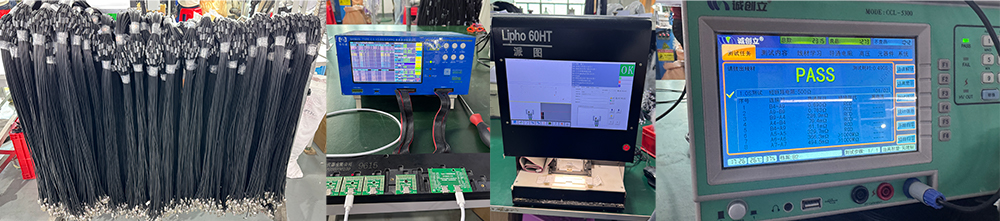
How We Evaluate High-Current Charging Cables
For a charger manufacturer, the number printed on a cable is only the starting point.
A high-current cable should be evaluated as part of a complete charging system.
At ZONSAN, a cable evaluation can include the following areas:
1. Current Capability
Check whether the cable can operate at its intended current under controlled conditions.
2. Voltage Drop
Measure voltage at the charger side and device side under load.
Voltage drop can help identify electrical losses in the cable and connection system.
3. Cable Temperature
Monitor cable temperature during sustained current operation.
4. Connector Temperature
The connector and contact area are also important because contact resistance can contribute to heat generation.
5. Charging Stability
Check whether the charging system can maintain stable power during extended operation.
6. Device Compatibility
Test the cable with different:
• chargers, smartphones, tablets, laptops, charging protocols
This system-level approach is particularly important when developing higher-power charging products.
3A vs 5A vs 6A Charging Cable Test
To better understand the differences between 3A, 5A and 6A charging cables, we conducted a controlled comparison using 1.5-meter cable samples.
The test evaluated electrical performance, voltage drop, temperature and E-Marker configuration under the same basic test conditions.
We also tested the cables with smartphones to see how different cable current ratings perform in real-world charging scenarios.
Test Conditions
| Test Parameter | Test Condition |
| Cable Length | 1.5 m |
| Test Voltage | 20 V |
| Test Current | 3A / 5A / 6A |
| Test Duration | 30 minutes |
| Ambient Temperature | 25°C |
| Load Type | Purely resistive load |
Note: The results below represent measurements from the tested samples under the specified test conditions. They should not be interpreted as universal performance values for every 3A, 5A or 6A charging cable.
3A vs 5A vs 6A Test Results
| Test Parameter | 3A Cable | 5A Cable | 6A Cable |
| Rated Current | 3A | 5A | 6A |
| Cable Length | 1.5M | 1.5M | 1.5M |
| Test Voltage | 20V | 20V | 20V |
| Test Current | 3A | 5A | 6A |
| Theoretical Power | 60W | 100W | 120W |
| Measured Power | 58.8W | 97.5W | 117.6W |
| Voltage Drop | 0.4V | 0.5V | 0.4V |
| Cable Temperature | 30–40°C | 30–40°C | 30–40°C |
| Connector Temperature | 38°C | 48.5°C | 50.5°C |
| Test Duration | 30 minutes | 30 minutes | 30 minutes |
| E-Marker | No | Yes | Yes |
What Do These Results Tell Us?
1. Measured Power Was Close to the Theoretical Power
At 20V, the theoretical power can be calculated using: Power = Voltage × Current
Therefore:
• 20V × 3A = 60W
• 20V × 5A = 100W
• 20V × 6A = 120W
Under our test conditions, the measured power was:
• 3A cable: 58.8W
• 5A cable: 97.5W
• 6A cable: 117.6W
The measured results were close to their corresponding theoretical values.
This demonstrates that the current rating of a cable is an important factor in higher-power charging applications. However, actual charging power still depends on the complete charging system, including the charger, cable, charging protocol and device.
2. Voltage Drop Was Measured Under Load
For the voltage-drop test, the power supply output was set to 20V, and the voltage was measured again at the other end of the cable under load.
For example:
Power supply output: 20.0V
Voltage at the other end of the cable: 19.6V
This corresponds to a measured voltage drop of: 20.0V − 19.6V = 0.4V
The voltage-drop results for the three tested cables were:
1. Measured Power Was Close to the Theoretical Power
At 20V, the theoretical power can be calculated using: Power = Voltage × Current
Therefore:
• 20V × 3A = 60W
• 20V × 5A = 100W
• 20V × 6A = 120W
Under our test conditions, the measured power was:
• 3A cable: 58.8W
• 5A cable: 97.5W
• 6A cable: 117.6W
The measured results were close to their corresponding theoretical values.
This demonstrates that the current rating of a cable is an important factor in higher-power charging applications. However, actual charging power still depends on the complete charging system, including the charger, cable, charging protocol and device.
2. Voltage Drop Was Measured Under Load
For the voltage-drop test, the power supply output was set to 20V, and the voltage was measured again at the other end of the cable under load.
For example:
Power supply output: 20.0V
Voltage at the other end of the cable: 19.6V
This corresponds to a measured voltage drop of: 20.0V − 19.6V = 0.4V
The voltage-drop results for the three tested cables were:
| Cable | Test Current | Voltage Drop |
| 3A | 3A | 0.4V |
| 5A | 5A | 0.5V |
| 6A | 6A | 0.4V |
Voltage drop is affected by the resistance of the cable and connection system.
This becomes increasingly important in higher-current charging applications because electrical losses are related to both current and resistance.
For this reason, a high-current charging cable should not be evaluated only by its printed amp rating. Cable construction, conductor size, connector quality and electrical resistance also matter.
3. Connector Temperature Increased at Higher Current
After 30 minutes of continuous testing, the measured connector temperatures were:
• 3A cable: 38°C
• 5A cable: 48.5°C
• 6A cable: 50.5°C
The cable body temperature remained within approximately 30–40°C across the three tested samples.
Under the same 25°C ambient temperature and test duration, the higher-current samples showed higher connector temperatures.
This highlights an important consideration for high-current charging: The connector is part of the electrical path and should be evaluated for thermal performance, not just the cable itself.
Contact resistance, connector construction and connection quality can all influence heat generation during high-current operation.
4. E-Marker Configuration Differed Between the Tested Samples
Our tested samples showed:
• 3A cable: No E-Marker
• 5A cable: E-Marker
• 6A cable: E-Marker
This demonstrates that cables with different current capabilities can have different internal configurations even when they use the same general USB-C connector.
However, this test should not be interpreted as a universal rule.
Not every 3A cable necessarily lacks an E-Marker, and the presence or configuration of an E-Marker depends on the specific cable design and applicable USB-C requirements.
For buyers selecting higher-power USB-C cables, checking the actual cable specification is therefore more useful than judging the cable only by its connector appearance.
Real-Device Charging Test
A resistive-load test shows how the cable performs under a controlled electrical load.
However, real smartphones behave differently because the device, charger, cable and charging protocol negotiate the charging conditions.
We therefore also tested the three cable samples with smartphones.
iPhone 17 Charging Test
The observed charging power for the iPhone 17 was:
This becomes increasingly important in higher-current charging applications because electrical losses are related to both current and resistance.
For this reason, a high-current charging cable should not be evaluated only by its printed amp rating. Cable construction, conductor size, connector quality and electrical resistance also matter.
3. Connector Temperature Increased at Higher Current
After 30 minutes of continuous testing, the measured connector temperatures were:
• 3A cable: 38°C
• 5A cable: 48.5°C
• 6A cable: 50.5°C
The cable body temperature remained within approximately 30–40°C across the three tested samples.
Under the same 25°C ambient temperature and test duration, the higher-current samples showed higher connector temperatures.
This highlights an important consideration for high-current charging: The connector is part of the electrical path and should be evaluated for thermal performance, not just the cable itself.
Contact resistance, connector construction and connection quality can all influence heat generation during high-current operation.
4. E-Marker Configuration Differed Between the Tested Samples
Our tested samples showed:
• 3A cable: No E-Marker
• 5A cable: E-Marker
• 6A cable: E-Marker
This demonstrates that cables with different current capabilities can have different internal configurations even when they use the same general USB-C connector.
However, this test should not be interpreted as a universal rule.
Not every 3A cable necessarily lacks an E-Marker, and the presence or configuration of an E-Marker depends on the specific cable design and applicable USB-C requirements.
For buyers selecting higher-power USB-C cables, checking the actual cable specification is therefore more useful than judging the cable only by its connector appearance.
Real-Device Charging Test
A resistive-load test shows how the cable performs under a controlled electrical load.
However, real smartphones behave differently because the device, charger, cable and charging protocol negotiate the charging conditions.
We therefore also tested the three cable samples with smartphones.
iPhone 17 Charging Test
The observed charging power for the iPhone 17 was:
| Cable | Standard Operating Power | Peak Power |
| 3A Cable | 27–30W | 28–37.8W |
| 5A Cable | 25–32W | 36–39.6W |
| 6A Cable | 37.4–40W | — |
The results show that the cable's current rating alone does not determine smartphone charging power.
The actual charging power depends on the interaction between the: Charger + Cable + Charging Protocol + Device
For example, although the 5A cable has a higher current capability than the 3A cable, the measured operating power was not necessarily higher in every condition.
This is an important distinction: A higher-rated cable provides greater current capability, but it does not automatically make every device charge faster.
Samsung Galaxy S26 Ultra Charging Test
We also tested the cables with the Samsung Galaxy S26 Ultra.
The actual charging power depends on the interaction between the: Charger + Cable + Charging Protocol + Device
For example, although the 5A cable has a higher current capability than the 3A cable, the measured operating power was not necessarily higher in every condition.
This is an important distinction: A higher-rated cable provides greater current capability, but it does not automatically make every device charge faster.
Samsung Galaxy S26 Ultra Charging Test
We also tested the cables with the Samsung Galaxy S26 Ultra.
| Cable | Observed Charging Power |
| 3A Cable | 50–60W |
| 5A Cable | 50–60W |
| 6A Cable | 52–60W |
Interestingly, the measured charging ranges were relatively similar across the three cable types.
This provides a practical example of why cable current rating should not be confused with actual device charging speed.
The 6A cable has a higher current capability than the 3A cable, but the smartphone does not necessarily use that additional capability.
The device's own charging limit and the negotiated charging protocol remain important factors.
What Out Test Shows About 3A, 5A and 6A Cables
Our test highlights several practical points:
3A cables
A 3A cable can provide substantial power at higher USB-C voltages.
In our controlled test, the 3A sample delivered 58.8W at 20V/3A.
5A cables
The 5A sample reached 97.5W at 20V/5A under the same test conditions.
This makes 5A-capable cables particularly relevant to higher-power charging applications.
6A cables
The 6A sample reached 117.6W at 20V/6A in our controlled test.
However, the additional current capability does not automatically translate into higher charging power for every smartphone.
The most important conclusion - Cable current rating describes capability, not guaranteed charging speed.
The actual charging result depends on the entire charging system.
The 6A cable has a higher current capability than the 3A cable, but the smartphone does not necessarily use that additional capability.
The device's own charging limit and the negotiated charging protocol remain important factors.
What Out Test Shows About 3A, 5A and 6A Cables
Our test highlights several practical points:
3A cables
A 3A cable can provide substantial power at higher USB-C voltages.
In our controlled test, the 3A sample delivered 58.8W at 20V/3A.
5A cables
The 5A sample reached 97.5W at 20V/5A under the same test conditions.
This makes 5A-capable cables particularly relevant to higher-power charging applications.
6A cables
The 6A sample reached 117.6W at 20V/6A in our controlled test.
However, the additional current capability does not automatically translate into higher charging power for every smartphone.
The most important conclusion - Cable current rating describes capability, not guaranteed charging speed.
The actual charging result depends on the entire charging system.

🔋 GaN Charger Meaning – The Future of Charging Is Here
We see “GaN chargers” everywhere, but what exactly are they?
🔍 GaN = Gallium Nitride
Instead of traditional silicon, GaN chargers use a more efficient, compact material. And yes, it's a game-changer.
🔋 Benefits of GaN Chargers
·Smaller size – Travel-friendly.
·Higher power – Supports up to 240W PD (USB Power Delivery).
·Faster charging – Especially with rapid charging cables like 5A/6A.
🚀 Pair a GaN charger with a 100 watt cable and you're flying.
❌ A disadvantage that isn't a disadvantage?
· Price: A bit more expensive than a typical PD charger.
· Compatibility: Not all devices can take full advantage of GaN’s power – for now (but most are already compatible).
However, if you’re in the mobile charger wholesale business, or are building a charger-centric brand, this is already a trend.
Here you can also learn about the differences between GaN and PD chargers.↗
How Do GaN, USB-C, PD and 5A Cables Relate to Each Other?
These terms are often used together, but they describe different parts of a charging system.
GaN
GaN refers to Gallium Nitride, a semiconductor material used in the power-conversion stage of some chargers.
USB-C
USB-C describes the connector and interface.
USB Power Delivery
USB PD is a power-delivery and charging protocol.
3A / 5A / 6A
These numbers describe current capability in a particular cable or charging system.
A simplified charging system can therefore be understood as:
GaN Charger → Charging Protocol → Cable → Device
Each component has its own capabilities and limitations.
A high-power GaN charger still needs a suitable cable and compatible device to deliver its intended charging performance.
🔗 USB-A vs USB-C vs Lightning – Which Connector Rules?
If you've ever googled “usb vs usb c charger” or “lightning or usb-c connector”, this one's for you.
🔹 USB-A: The Classic Veteran
·Use case: Still used in many legacy chargers.
·Limitation: Slower data and power transfer.
·Keywords to know: usb a vs usb c charger, usb vs usb c charging.
🔹 USB-C: The All-Star
·Use case: Laptops, Android phones, iPads.
·Supports: Up to 240W with PD 3.1, perfect for oem apple charger or samsung oem charger compatibility.
📈 It's also dominating the Samsung charger original space for new Galaxy models.
🔹 Lightning: Apple’s Private Club
·Use case: iPhones, some iPads.
·Pros: Compact, durable.
·Cons: Lower power delivery. Likely to be phased out as Apple moves toward USB-C.
USB-C Connector Does Not Automatically Mean High-Power Charging
One important point is worth adding: USB-C describes the connector, not a single universal charging capability.
Two USB-C cables can look almost identical while supporting different:
• power levels
• current ratings
• data speeds
• charging protocols
• cable lengths
• E-Marker configurations
This is why consumers and B2B buyers should look beyond the connector itself.
When choosing a USB-C cable, check the actual cable specification, not just the shape of the connector.
One important point is worth adding: USB-C describes the connector, not a single universal charging capability.
Two USB-C cables can look almost identical while supporting different:
• power levels
• current ratings
• data speeds
• charging protocols
• cable lengths
• E-Marker configurations
This is why consumers and B2B buyers should look beyond the connector itself.
When choosing a USB-C cable, check the actual cable specification, not just the shape of the connector.

If you're targeting Samsung OEM charger, OEM Apple charger, or OEM Samsung charger listings, clarity is crucial.
OEM = Original Equipment Manufacturer
·Often made by third parties but meet the brand's specs.
·Lower cost than original, often bulk-ordered for e-commerce or wholesale.
🔋 Pro Tip: Always check wattage and amperage. That OEM charger may say “fast,” but does it handle 5A or only 2.4A?
The market is flooded with non-standard chargers and low-quality chargers. Perhaps a more careful distinction can avoid after-sales problems.
What Should OEM and B2B Buyers Check?
For OEM, ODM and wholesale projects, cable selection involves more than choosing a 3A, 5A or 6A label.
Buyers should evaluate:
• target charging power
• supported charging protocols
• cable length
• conductor specification
• connector design
• E-Marker requirements
• voltage drop
• thermal performance
• durability
• certification requirements
• compatibility with target devices
• production consistency
For example, when developing a 65W or 100W charging solution, the cable should be evaluated together with the charger and target device.
This system-level approach can help reduce compatibility problems and after-sales issues.
🌡 Why Does My Phone Get Hot When Charging?
If your phone gets hot when charging, here’s what could be going on:
·You’re using the wrong amperage cable (e.g., using 3A for a 5A phone).
·Your charger doesn’t match the cable power output.
·Background apps are draining battery while charging.
·Battery damage/swelling, etc. (maybe you need to check and replace the battery)
🧠 Fix it fast: Match a high-quality cable like a 5A USB C cable or 100 watt cable with a certified charger.
Is the Cable Really the Reason Your Phone Gets Hot?
A warm phone during charging does not automatically mean that the cable is the problem.
Heat can come from several parts of the charging system, including:
• the charger
• the cable
• the phone's charging circuit
• the battery
• charging power
• ambient temperature
• background activity
• wireless charging losses, where applicable
Fast charging can naturally generate some heat because energy conversion is not 100% efficient.
The more useful question is not simply: “Is my phone warm?”
but: “Is the temperature unusually high for this device and charging condition?”
If a device becomes unusually hot, repeatedly stops charging, or shows signs of battery swelling or damage, stop using the equipment and follow the device manufacturer's safety guidance.
How to Choose Between a 3A, 5A and 6A Cable
Instead of starting with: “Which cable has the highest amp rating?”
Start with these questions.
1. What device are you charging?
Is it a smartphone, tablet, laptop or another USB-powered device?
2. What is the device's maximum charging power?
A 100W-capable cable cannot make a 25W device charge at 100W.
3. What charging protocol does the device use?
For example:
• USB Power Delivery
• PPS
• proprietary fast charging
4. What can the charger provide?
The charger must support the required power and charging protocol.
5. What cable capability is required?
Choose the cable based on the intended voltage, current and charging specification.
6. Does the cable require an E-Marker?
For applicable higher-power USB-C applications, verify the cable's specification.
7. What cable length is appropriate?
Longer cables can have different resistance, voltage-drop and thermal characteristics.
Quick rule
| Your Priority | What to Focus On |
| Everyday phone charging | Device requirement + cable quality |
| Tablet charging | Device power + charger compatibility |
| 60W-class charging | 3A capability where applicable |
| 100W-class USB-C charging | 5A capability where applicable |
| Higher-current proprietary charging | Specific manufacturer/system specification |
| OEM/B2B projects | Complete system testing and certification |
🧠 Final Thoughts: What to Do with All This Info?
If you're in the B2B charger game—retail, OEM supply, or wholesale—you can't afford to guess.
👉 Match the right charging cable with the right charger input types.
👉 Know your amperage labels: what is 3A, what does 5A mean, what is 6A, etc.
👉 Choose cables and chargers that meet both the power needs of market customers and their devices.
⭐Pay attention to the quality of the charger, which can save users a lot of trouble.
⚙ After layers of research, design your OEM charger
A fast charge isn't just about speed—it's about compatibility, safety, and long-term battery health.
The Complete Charging System Matters
A charging solution should not be judged by the cable, charger or device alone.
Think of the system as: Charger + Protocol + Cable + Device
The actual charging performance is determined by how these components work together.
A high-power charger cannot make an incompatible device accept more power.
A high-current cable cannot force a device to charge faster than its design allows. And a device's maximum charging capability does not mean that every cable or charger can deliver that power.
For consumers, this means choosing compatible products.
For charger brands and B2B buyers, it means designing and testing the complete charging solution.
From a Charger Manufacturer's Perspective
For a charger manufacturer, understanding cable capability is important because the charger is only one part of the charging system.
When developing a charging product, we may need to consider:
target device
• charging protocol
• output voltage
• output current
• cable capability
• connector design
• thermal performance
• safety requirements
• certification
• production consistency
This system-level approach is particularly important for higher-power products.
For OEM and ODM customers, the goal should not simply be to achieve the largest wattage number.
The goal is to develop a charging solution that is compatible, stable, safe and appropriate for the target market.
Frequently Asked Questions
Q1: Is a 5A cable faster than a 3A cable?
Not necessarily. A 5A cable has a higher current capability, but actual charging speed depends on the charger, device, charging protocol and cable working together.
Q2: Can a 3A cable support 60W?
At 20V and 3A, the theoretical electrical power is 60W.
Actual charging performance depends on the applicable charging specification and the capabilities of the charger and device.
Q3: Can a 3A cable charge a 100W laptop?
It depends on the charging voltage and system requirements.
At a 20V operating point, 100W requires 5A, so a 3A cable should not simply be treated as a 100W cable at that voltage.
Q4: Do I need a 5A cable for a 100W charger?
For 100W at 20V, 5A is required mathematically.
The charger, device and cable must all support the required operating conditions.
Q5: Does a 6A cable always provide 120W?
No. 120W is the result of:
20V × 6A = 120W
A “6A” label alone does not guarantee 120W operation.
Q6: What is an E-Marker cable?
An E-Marker is an electronic marker used in applicable USB-C cables to communicate information about the cable's capabilities to the charging system.
Q7: Are all USB-C cables capable of 100W?
No. USB-C cables can have different power, current, data and construction specifications.
Always check the cable's actual rated capabilities.
Q8: Does a longer charging cable charge slower?
A longer cable can introduce greater resistance and voltage drop, depending on its construction, conductor size and length.
For high-power applications, cable length should therefore be considered as part of the overall system design.
Q9: Is a higher-amp cable always better?
No. The best cable is the one that correctly matches the charger, device, charging protocol and required power.
A higher-rated cable may provide additional capability, but it does not automatically make a lower-power device charge faster.
🧩 Suggested Reading from Our Blog:
🔗 The Difference Between 3A and 5A Charging Cables.↗
🔋 The Pros and Cons of GaN Chargers.↗
Reviewed by: ZONSAN R&D Team — Miller
Technical Review: Charging Products & Power Solutions
Last reviewed: [August 2026]
If you're in the B2B charger game—retail, OEM supply, or wholesale—you can't afford to guess.
👉 Match the right charging cable with the right charger input types.
👉 Know your amperage labels: what is 3A, what does 5A mean, what is 6A, etc.
👉 Choose cables and chargers that meet both the power needs of market customers and their devices.
⭐Pay attention to the quality of the charger, which can save users a lot of trouble.
⚙ After layers of research, design your OEM charger
A fast charge isn't just about speed—it's about compatibility, safety, and long-term battery health.
The Complete Charging System Matters
A charging solution should not be judged by the cable, charger or device alone.
Think of the system as: Charger + Protocol + Cable + Device
The actual charging performance is determined by how these components work together.
A high-power charger cannot make an incompatible device accept more power.
A high-current cable cannot force a device to charge faster than its design allows. And a device's maximum charging capability does not mean that every cable or charger can deliver that power.
For consumers, this means choosing compatible products.
For charger brands and B2B buyers, it means designing and testing the complete charging solution.
From a Charger Manufacturer's Perspective
For a charger manufacturer, understanding cable capability is important because the charger is only one part of the charging system.
When developing a charging product, we may need to consider:
target device
• charging protocol
• output voltage
• output current
• cable capability
• connector design
• thermal performance
• safety requirements
• certification
• production consistency
This system-level approach is particularly important for higher-power products.
For OEM and ODM customers, the goal should not simply be to achieve the largest wattage number.
The goal is to develop a charging solution that is compatible, stable, safe and appropriate for the target market.
Frequently Asked Questions
Q1: Is a 5A cable faster than a 3A cable?
Not necessarily. A 5A cable has a higher current capability, but actual charging speed depends on the charger, device, charging protocol and cable working together.
Q2: Can a 3A cable support 60W?
At 20V and 3A, the theoretical electrical power is 60W.
Actual charging performance depends on the applicable charging specification and the capabilities of the charger and device.
Q3: Can a 3A cable charge a 100W laptop?
It depends on the charging voltage and system requirements.
At a 20V operating point, 100W requires 5A, so a 3A cable should not simply be treated as a 100W cable at that voltage.
Q4: Do I need a 5A cable for a 100W charger?
For 100W at 20V, 5A is required mathematically.
The charger, device and cable must all support the required operating conditions.
Q5: Does a 6A cable always provide 120W?
No. 120W is the result of:
20V × 6A = 120W
A “6A” label alone does not guarantee 120W operation.
Q6: What is an E-Marker cable?
An E-Marker is an electronic marker used in applicable USB-C cables to communicate information about the cable's capabilities to the charging system.
Q7: Are all USB-C cables capable of 100W?
No. USB-C cables can have different power, current, data and construction specifications.
Always check the cable's actual rated capabilities.
Q8: Does a longer charging cable charge slower?
A longer cable can introduce greater resistance and voltage drop, depending on its construction, conductor size and length.
For high-power applications, cable length should therefore be considered as part of the overall system design.
Q9: Is a higher-amp cable always better?
No. The best cable is the one that correctly matches the charger, device, charging protocol and required power.
A higher-rated cable may provide additional capability, but it does not automatically make a lower-power device charge faster.
🧩 Suggested Reading from Our Blog:
🔗 The Difference Between 3A and 5A Charging Cables.↗
🔋 The Pros and Cons of GaN Chargers.↗
Reviewed by: ZONSAN R&D Team — Miller
Technical Review: Charging Products & Power Solutions
Last reviewed: [August 2026]